

Purchase Orders
The PO list with order and inventory status, and the full detail of a PO — editable while it's open, with a receiving report once it's done.
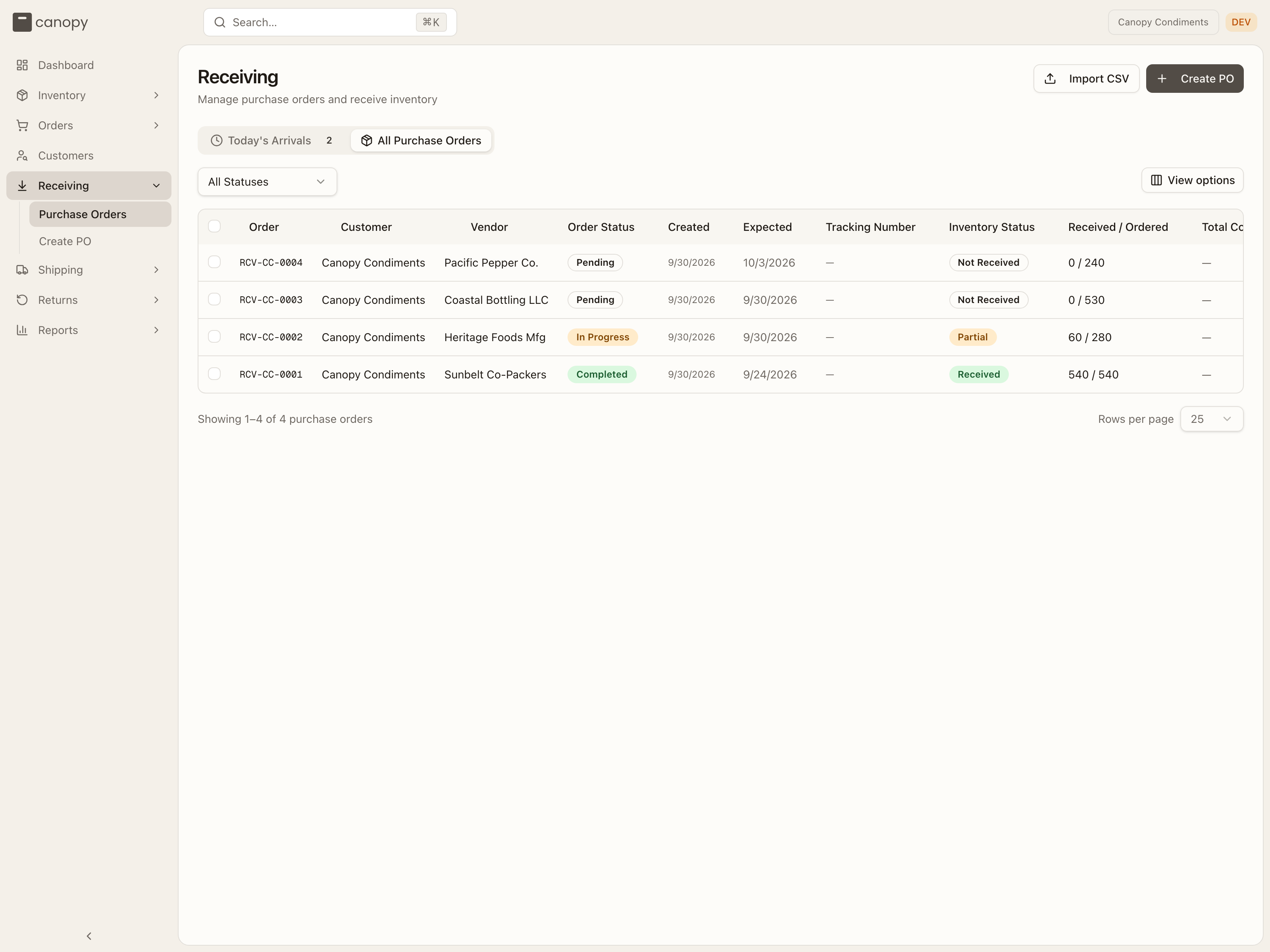
Receiving → Purchase Orders is the list of everything you've told the warehouse to expect, with live receiving progress. Import CSV and Create PO sit in its header.
The purchase order list
Two tabs:
- Today's Arrivals — POs expected to land today, as quick-glance cards (PO number, status, vendor, how many lines and units) with a Details button.
- All Purchase Orders — the full table.
The table's columns are Order (the PO number), Customer (your brand),
Vendor, Order Status, Created, Expected, Tracking Number,
Inventory Status, Received / Ordered (e.g. 60 / 280), Total Cost,
and Warehouse Note (a note the PO carries). Click any header to sort (Total
Cost doesn't sort — it has no values yet), use View options to hide or
reorder columns, and page through with the rows-per-page picker at the bottom.
The status dropdown filters to All Statuses, Pending, In Progress, Completed,
or Cancelled. Click a row to open the PO.
Tick rows to open a selection bar — the header checkbox selects the page, and the bar offers Select all across every page. Cancel cancels the selected POs after a confirm. Only a Pending PO, or an In Progress one with nothing received yet, can be cancelled; the bar says how many of your selection can't be. Cancelling is permanent. Units the warehouse rejected as damaged count as received here, though the bar only counts good units: a PO whose only receipts are rejected units is offered, and then refused with "Cannot cancel a shipment with received or rejected items. Complete it, or unreceive them first." Ask your 3PL to unreceive them, or let the PO complete.
Each PO carries two status signals:
| Order Status | Meaning |
|---|---|
| Pending | Created; the warehouse hasn't started on it. |
| In Progress | The warehouse is actively receiving it. |
| Completed | Receiving finished. |
| Cancelled | Cancelled before completion. |
| Inventory Status | Meaning |
|---|---|
| Not Received | No units in yet. |
| Partial | Some units received. |
| Received | Everything (or more) accounted for, counting damaged units. |
Importing purchase orders from a CSV
Import CSV, beside Create PO in the page header, creates several POs from one file — one row per PO line; rows with the same PO Number become one PO. The dialog is Import purchase orders CSV, and Download template gives you a file with the accepted columns and one example row. If your 3PL runs more than one warehouse and none is pinned in the top bar, a Warehouse picker asks "Which warehouse are these POs for?".
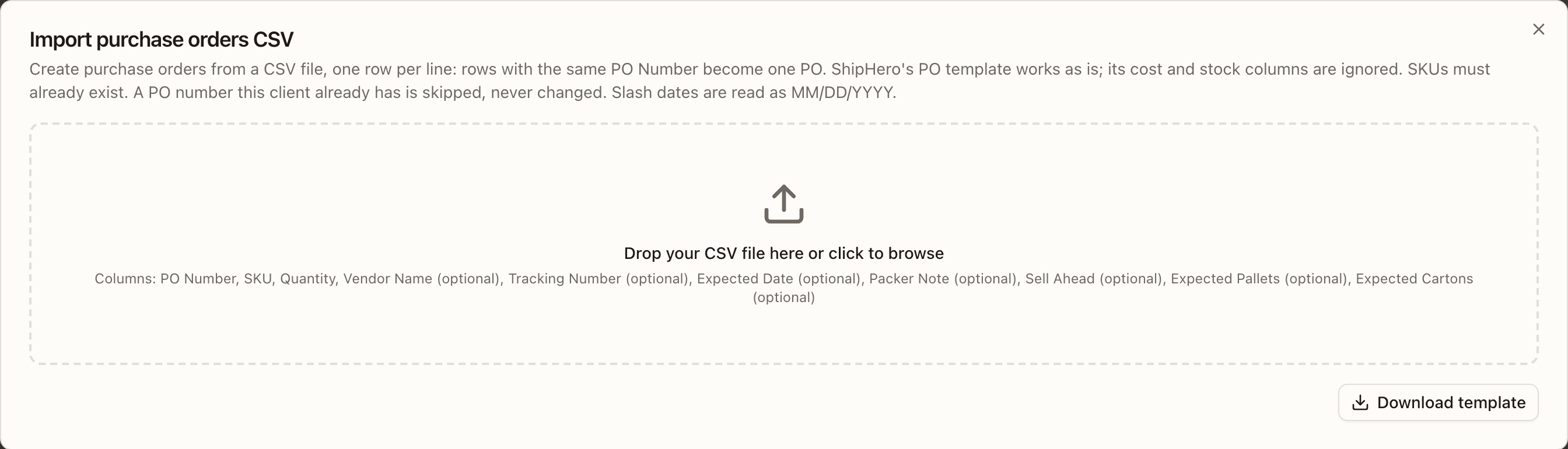
PO Number, SKU and Quantity are required; Vendor Name,
Tracking Number, Expected Date (YYYY-MM-DD, or MM/DD/YYYY),
Packer Note, Sell Ahead, Expected Pallets and Expected Cartons
are optional. The header fields belong to the PO: fill them on its first row —
a later row may repeat them or leave them blank, but a different value is an
error. Every SKU has to exist in your catalogue already (SKU X not found —
create it in Inventory › SKUs first), a PO number you already have is skipped
rather than changed, and Sell Ahead can't exceed the line's quantity and
is ignored with a warning unless your 3PL has opted you in. A blank row in the
file is skipped (the N rows read count leaves it out), and a column the
import doesn't know — or a second name for a column it already has — is
ignored with a warning rather than refused.
Choose the file and read the preview: every row gets a verdict, rejected rows first, and nothing is created while any row is rejected — Download errors.csv hands the file back with the reason on each rejected row, so you can fix those cells and choose it again. Create N writes the POs, each as Pending and exactly as the Create PO form would have made it; they appear in the list and, when due today, under Today's Arrivals.
Following a PO
Open a PO to see its detail: the number and status, the vendor, a row of header buttons, and four tabs.
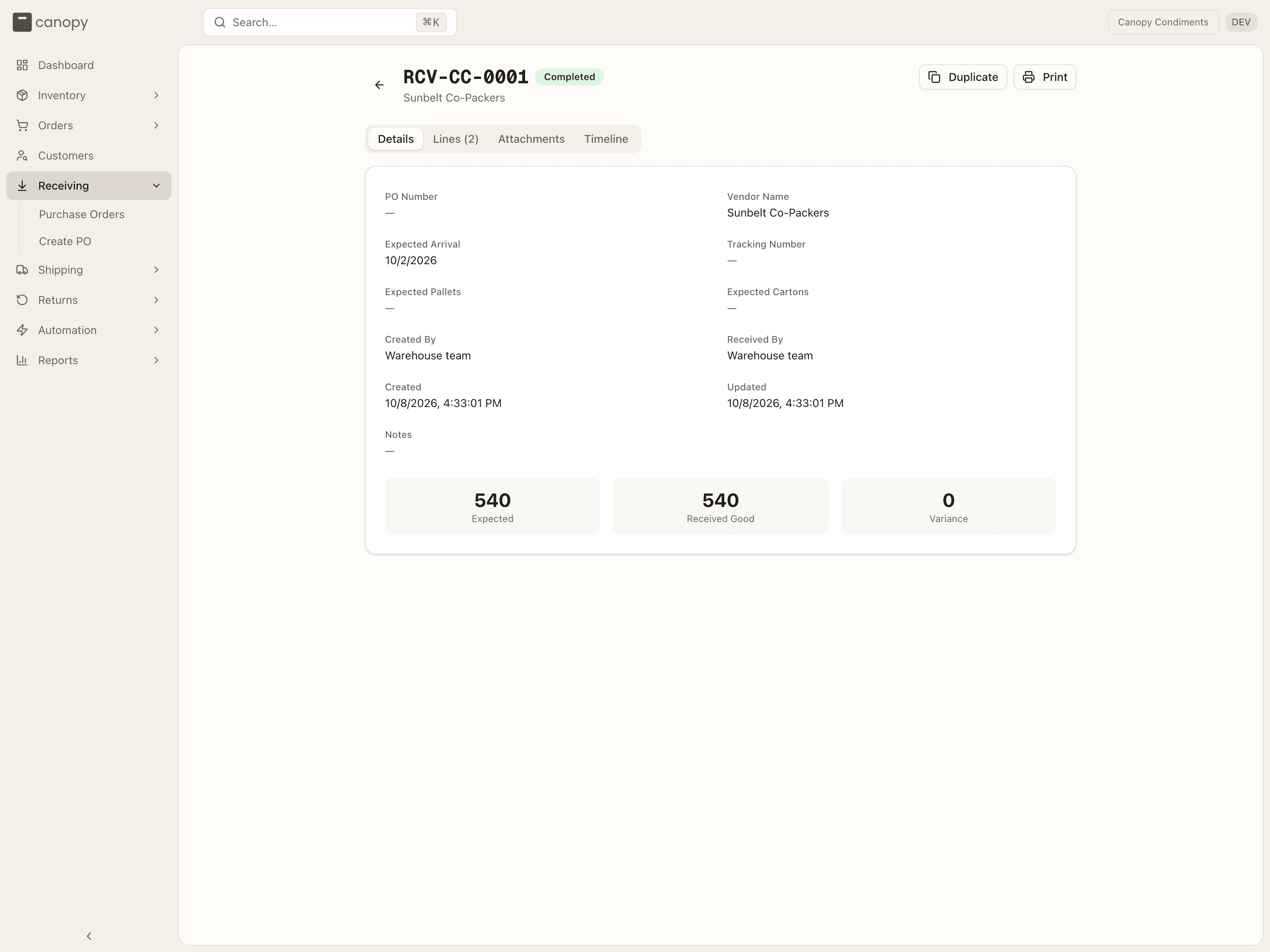
The header shows Cancel while the PO is Pending, or In Progress with nothing received yet (it asks you to confirm). It counts good units only: on a PO whose only receipts are rejected units the button still shows, and the confirm comes back with "Cannot cancel a shipment with received or rejected items. Complete it, or unreceive them first." Duplicate opens Create PO pre-filled with this PO's vendor, dates, counts, and lines. Print prints the PO at any stage — an in-progress PO prints a live summary of its lines.
What you can change
A PO is yours to edit until it's completed. While it's Pending or In Progress you can change its details, adjust or add lines, remove lines, and cancel it. The warehouse's own work — starting the receipt, scanning units, choosing bins, reversing a receipt — is theirs alone: those actions are refused for a brand account, and the one thing you can't set on a line is its putaway location.
Details
PO Number (your own reference when the PO came in through an integration — read-only), Vendor Name, Expected Arrival, Tracking Number, Expected Pallets and Expected Cartons (each showing received N once the warehouse has counted), Created By, Received By, Created, Updated, and Notes. While the PO is Pending or In Progress, a pencil icon beside vendor, arrival, tracking, pallets, cartons, and notes edits that field in place.
The totals row shows Expected, Received Good, Damaged (only when there are damaged units), and Variance.
Lines
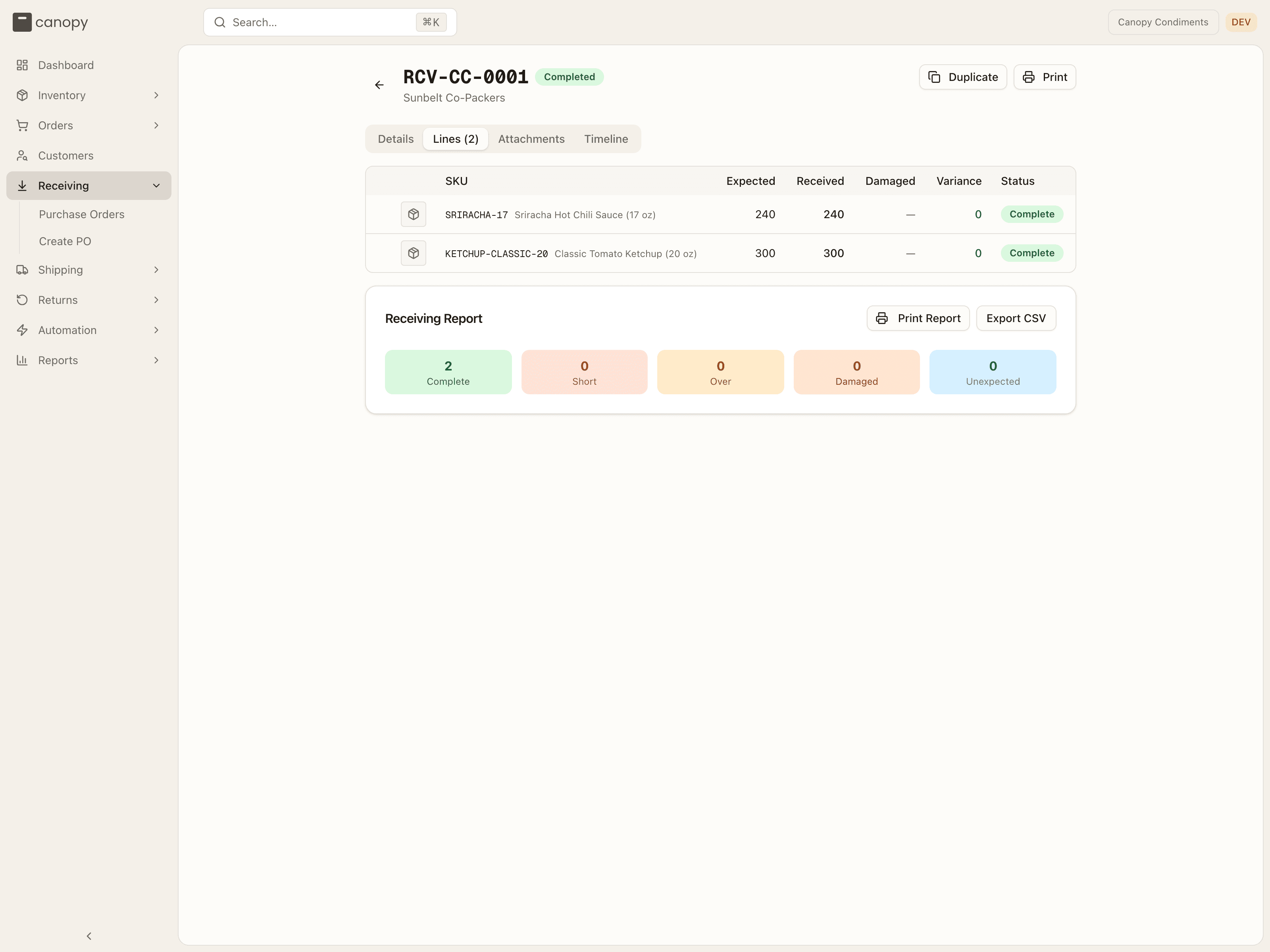
Receiving progress per item — the SKU, Expected, Received, Damaged, Variance (once completed, coloured by sign), and Status:
| Line status | Meaning |
|---|---|
| Pending | Not received yet. |
| Partial | Some of the expected quantity received. |
| Complete | Received in full. |
| Over | More received than expected. |
| Short | Finished receiving with fewer than expected. |
A line the warehouse added that wasn't on your PO carries an Unexpected badge. A line with receipts expands to show each one — when it was booked, and how many good and damaged units it covered.
While the PO is Pending or In Progress the tab is editable: Expected becomes an input, a trash icon removes a line, Add Line adds a row with a SKU search, and Save Changes appears once something has changed. Changing Expected updates that line's Status right away, judged against what the warehouse has already booked, good plus damaged: set it to what came in and the line reads Complete; set it below that and it reads Over. If your 3PL has opted your brand in to sell-ahead, a Sell ahead column lets you set how many units of each line you'll sell before the stock lands — never more than the line's expected quantity.
Once a PO is Completed and any line was short, over, damaged, or unexpected, a Discrepancy Notes card lists those lines with a note box each — type a note and it saves when you leave the field, so you can record what to take up with the vendor. Below it, the Receiving Report summarizes the outcome — Complete, Short, Over, Damaged, and Unexpected counts — with Print Report and Export CSV.
Attachments
Drag in packing lists, invoices, or photos (PDF, image, or spreadsheet) to keep supporting documents with the PO. Anyone who can open the PO can download them; you can remove the ones you uploaded.
Problem reports
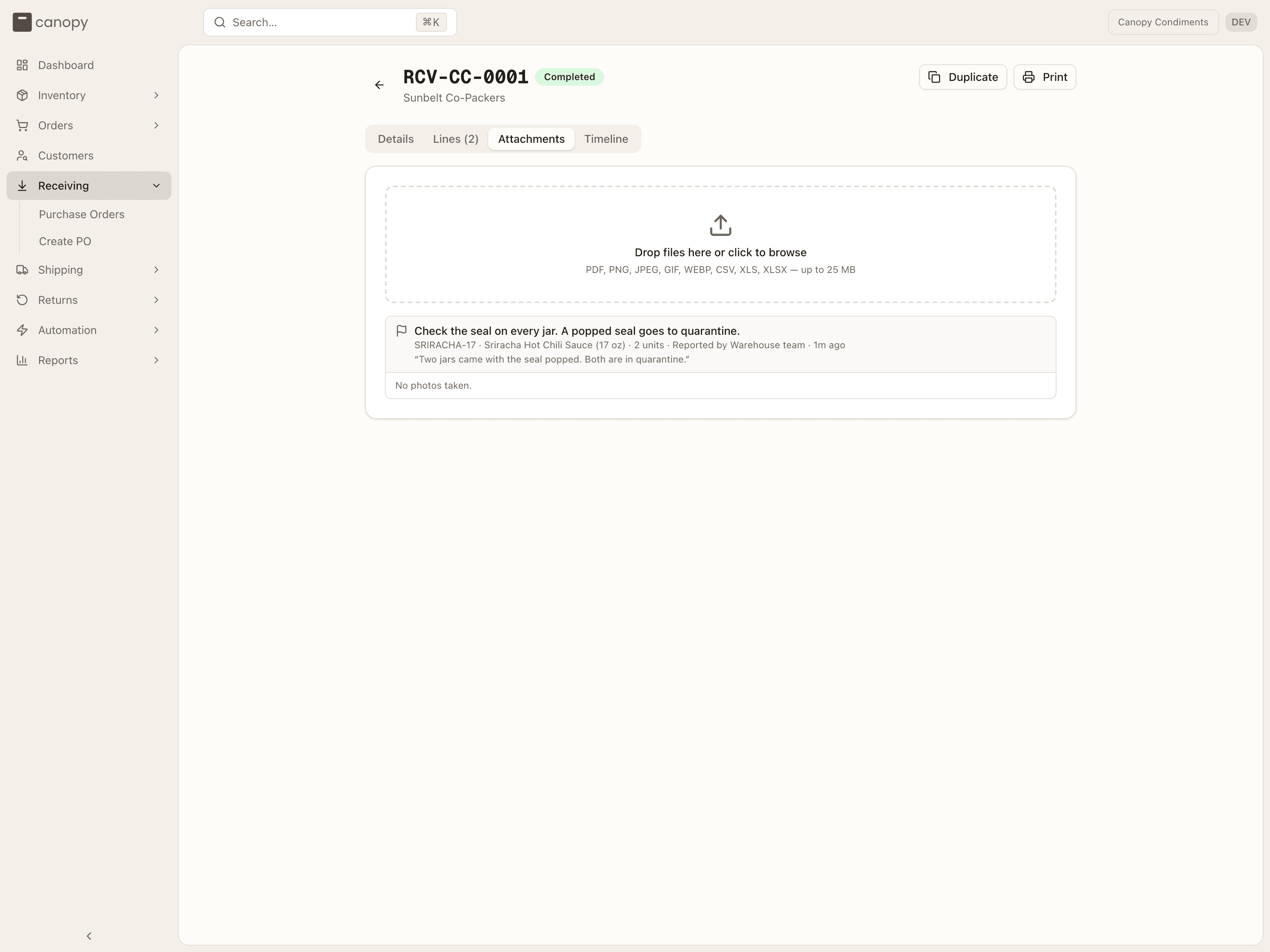
When the warehouse rejects units of your product, the receiver records why. That report shows here: what was wrong (the receiving note that was broken, or Other and their words), the product and the units, Reported by Warehouse team and when, their comment, and the photos they took. A report with no photos reads No photos taken. Your own files are listed after the reports, under Other files. Show opens a photo; Download saves it.
Timeline
A running log of everything that happened to the PO — created, edited, received, status changes, and a Problem reported by the receiver — plus an "Add a note..." composer to leave a comment for your 3PL. You can edit your own notes afterwards.
The physical receiving — scanning units into bins — is done by your 3PL's warehouse team, and the bin each unit went into is theirs to see, not yours: the Lines tab and the CSV export leave bin locations out for brand accounts. What you'll see is progress, discrepancies, and the receiving report.
How to import purchase orders from a CSV
Open Purchase Orders and press Import CSV
Open Receiving → Purchase Orders and press Import CSV, beside Create PO in the page header. The Import purchase orders CSV dialog opens. Creating POs is yours to do, so the button is there on a brand account.
Press Download template
Press Download template under the drop zone to get Canopy's CSV with one example row. The drop zone lists the columns: PO Number, SKU and Quantity are required; Vendor Name, Tracking Number, Expected Date, Packer Note, Sell Ahead, Expected Pallets and Expected Cartons are optional. A ShipHero PO export works as it is.
Fill one row per PO line
Give each line its own row. Rows that share a PO Number become one PO: put the vendor, tracking, expected date and counts on that PO's first row and leave them blank or identical on the rest. Every SKU must already be in your catalogue, and Expected Date is YYYY-MM-DD or MM/DD/YYYY. A PO number you already have is skipped, never changed.
Drop the file on the dialog
Drag the file onto "Drop your CSV file here or click to browse", or click there and choose it. The dialog reads the file and says "N rows read."; a column it does not know is listed in an "Ignored column(s)" warning. If the file cannot be read at all, the reason shows in red with "Fix the file and choose it again. Nothing was imported." and Choose different file. When your 3PL runs more than one warehouse and neither the top bar nor your account's default warehouse settles which one, a Warehouse picker appears here asking "Which warehouse are these POs for?"; pick one before going on.
Press Preview
Press Preview (it reads Previewing… while the rows are checked). Nothing is created yet. Badges count the rows that are ok, have warnings, are rejected, or are skipped, and the table shows every row with its Status and Result, rejected rows first. If any row is rejected the import cannot go ahead: press Download errors.csv to get the whole file back with the reason on each rejected row, fix those cells, and choose that file again with Choose different file.
Press Create N
When every row passes, press Create N (N is the number of rows that will be written; it reads Create N, skip M when some rows are skipped). The button reads Importing…, then Import complete shows Rows applied, With warnings, Rejected and Skipped. Press Done, or Import another for the next file. Each new PO is in the list as Pending, and under Today's Arrivals when it is due today.