

SKUs
Your product catalogue with live stock figures, days-of-stock pills, bulk attribute edits, per-SKU detail, and adding a SKU.
Inventory → SKUs is your product catalogue with live stock figures.
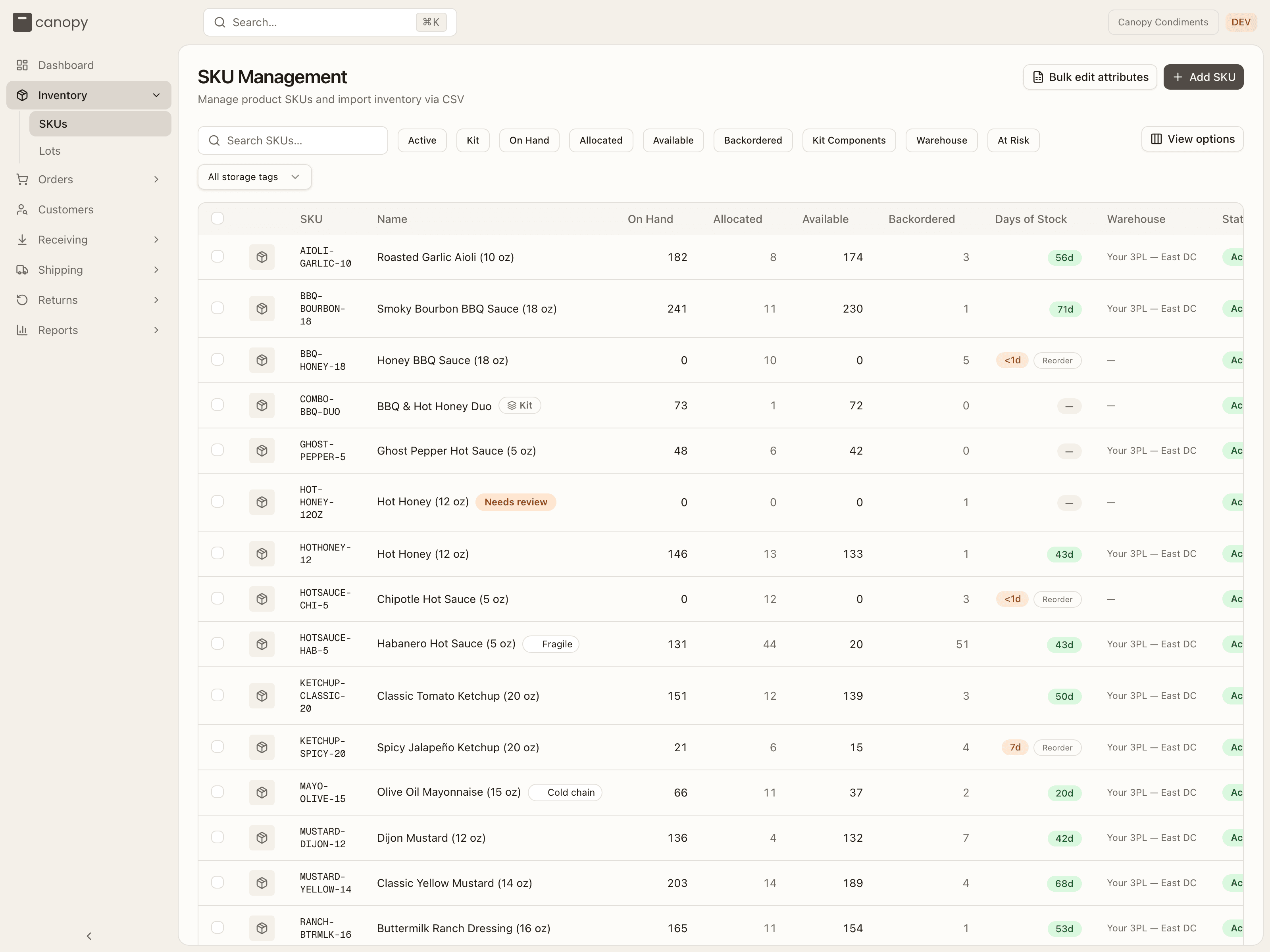
Each row shows the SKU code and image, the name, then On Hand, Allocated, Available and Backordered, a days of stock pill, the Warehouse the stock sits in, and a Status badge. Click any column header to sort the whole catalogue by it, and use View options to hide columns you don't need.
The days-of-stock pill is how long current stock lasts at your recent sales pace (on hand ÷ units shipped per day over the last 30 days — hover the pill for the math):
| Pill color | Days of stock | Read it as |
|---|---|---|
| 🔴 Red | under 7 (or below reorder point) | Reorder now |
| 🟡 Amber | 7 to under 14 | Reorder soon |
| 🟢 Green | 14 or more | Healthy |
| — | no recent sales | No velocity to project from |
A Reorder badge appears next to the pill when on-hand drops to or below the SKU's reorder point. Badges in the name cell flag special SKUs:
- Kit — a bundle made of other SKUs.
- Non-physical — a digital item or service that holds no stock.
- Storage tag chips — the placement rules your 3PL has set on the SKU (for example Refrigerated), up to two shown inline.
- Needs review — a SKU Canopy created on its own when an order arrived with a code it didn't recognise; your 3PL resolves it (see Merged SKUs and SKUs under review).
The Status column shows each SKU as Active or Inactive — inactive SKUs are discontinued but kept for history (never deleted). A SKU your 3PL merged into another is inactive too, and its detail says which SKU it now points to.
Sell Ahead
If your 3PL has switched sell ahead on for your account, a Sell Ahead column joins the list: units on an open purchase order that you're advertising to opted-in sales channels before they arrive. They're never allocatable — orders for them wait as backorders until the PO is received.
Filters and search
Type in Search SKUs… to match a code or name. Nine filter chips narrow the list, and each one cycles through all → show only → hide: Active, Kit, On Hand, Allocated, Available, Backordered, Kit Components, Warehouse, and At Risk (anything low or below its reorder point). Once your 3PL has defined at least one storage tag, a Storage tag dropdown appears after the chips to show only SKUs that require a given tag. Every filter runs against the whole catalogue, not just the page on screen — At Risk plus Backordered is the fastest reorder shortlist.
Adding a SKU
Use Add SKU to create a new product in your catalogue.
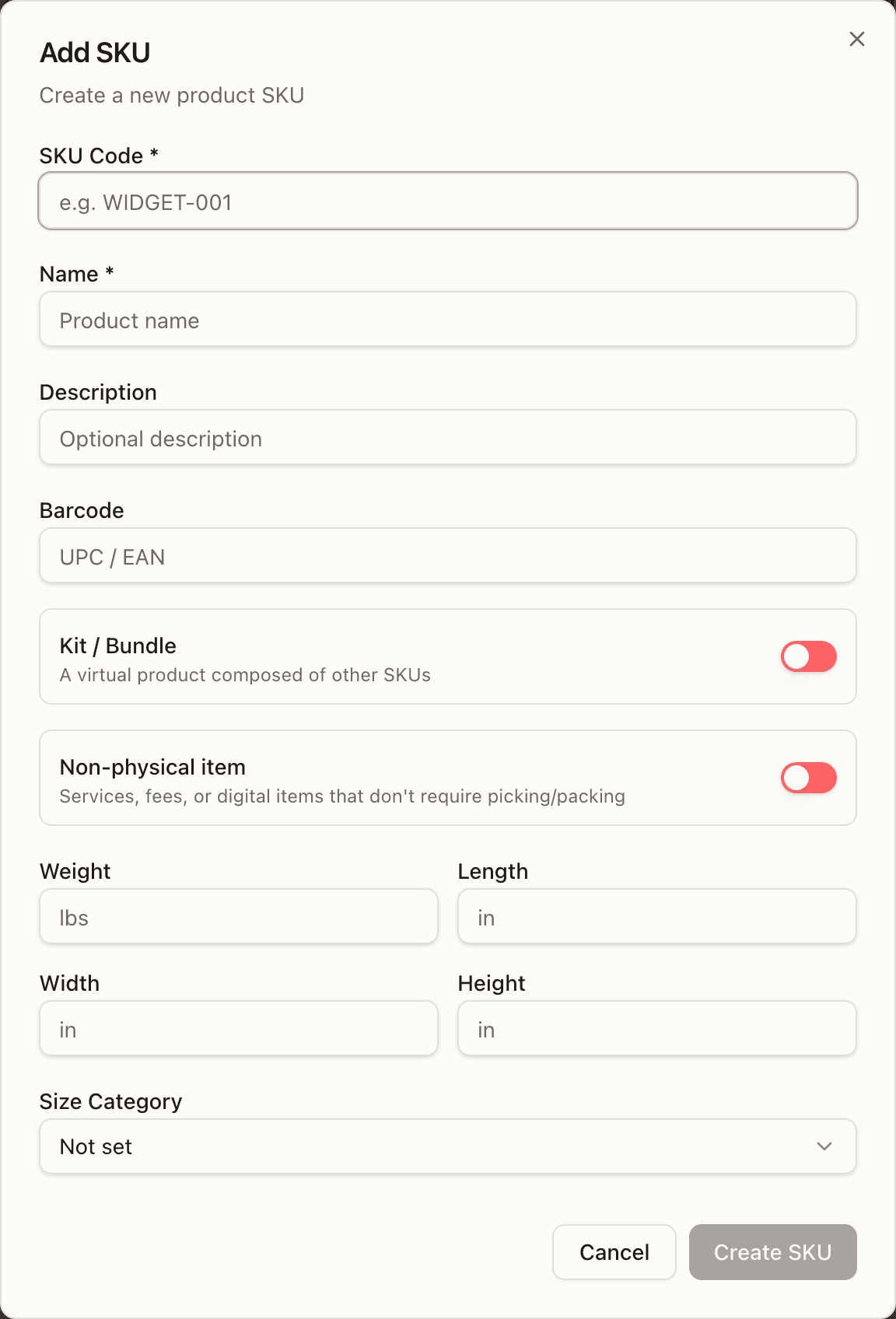
Give it a SKU Code and Name (the two required fields), then optionally a Description, a Barcode (UPC / EAN), weight and dimensions, and a Size Category (Small, Medium, Large, Extra Large). Two switches change what kind of SKU it is:
- Kit / Bundle — a virtual product composed of other SKUs. Turning it on swaps the physical fields for a Components search: add each component SKU and its quantity (at least one is required), and the button becomes Create Kit. A component can't be a SKU that was merged into another — the search doesn't offer one, and the server refuses it.
- Non-physical item — a service, fee or digital item that skips picking and packing.
Placing the first units into a bin is your 3PL's job — you create the SKU, they receive stock against it, so there's no starting-stock step here. Storage tags (where a SKU may be put away) are also set by your 3PL.
Bulk edit attributes
Two entry points open the Bulk edit SKU attributes dialog:
- Bulk edit attributes in the page header — the whole-catalogue route. Export catalogue CSV downloads every SKU with its editable columns; edit it in a spreadsheet, keep the ID column, remove any column you don't want to touch, then Upload edited CSV. Blank cells clear values.
- Tick rows in the list, then Edit selected attributes in the selection bar (Select all N matching rows extends a selection across pages). This route is a form instead of a spreadsheet: tick the fields you want to change and type the shared value; a ticked field left blank clears it. Review changes builds the upload for you.
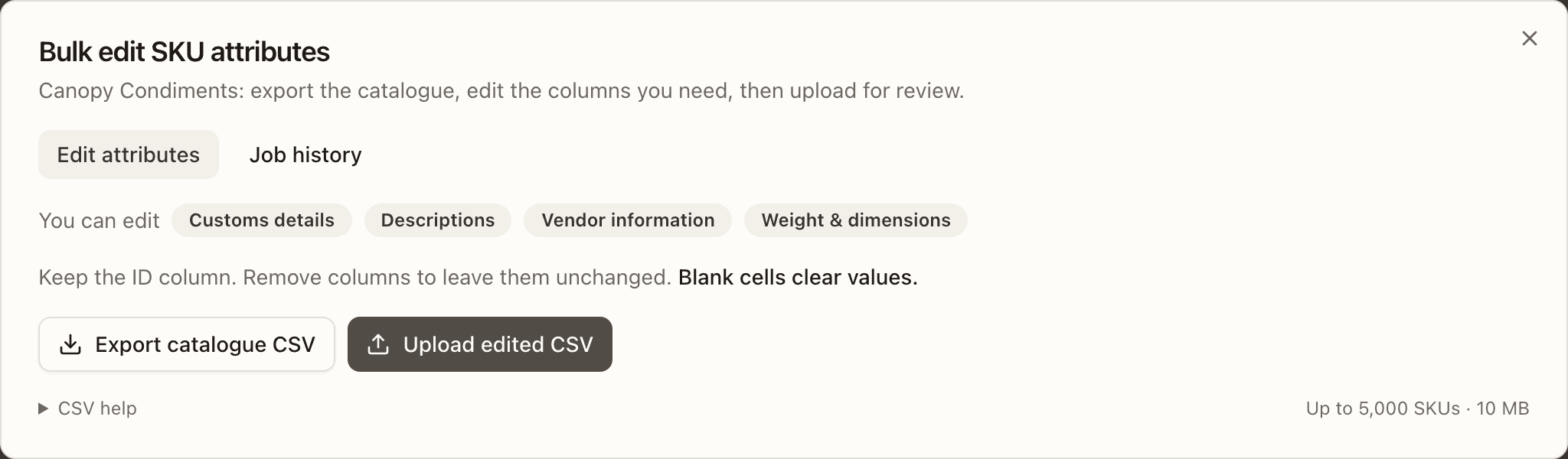
The editable attributes are customs details (value, currency, description, country of manufacture, tariff code), descriptions, vendor information (name, part number), and weight and dimensions. Up to 5,000 SKUs and 10 MB per upload; the CSV help disclosure covers Excel quirks (import code columns as Text, keep apostrophe prefixes, save as UTF-8) and units (weight in oz, dimensions in inches, country and currency as codes, tariff codes of 6–13 digits).
Every upload is validated first and nothing is written until you apply. The preview lists the file's status, how many rows change, stay unchanged or clear a value, and any errors (with Download all errors); a per-column count and a paged before/after table show exactly what will change. When it's clean, tick I reviewed the N SKU changes and Apply changes to N SKUs. Only the person who uploaded a preview can apply it. Job history keeps every upload with who ran it and when — View preview reopens one, Original file (.txt) re-downloads it, Error report is there for a rejected or failed job, and Prior values CSV on an applied job is the undo: upload it again to put the old values back.
SKU detail
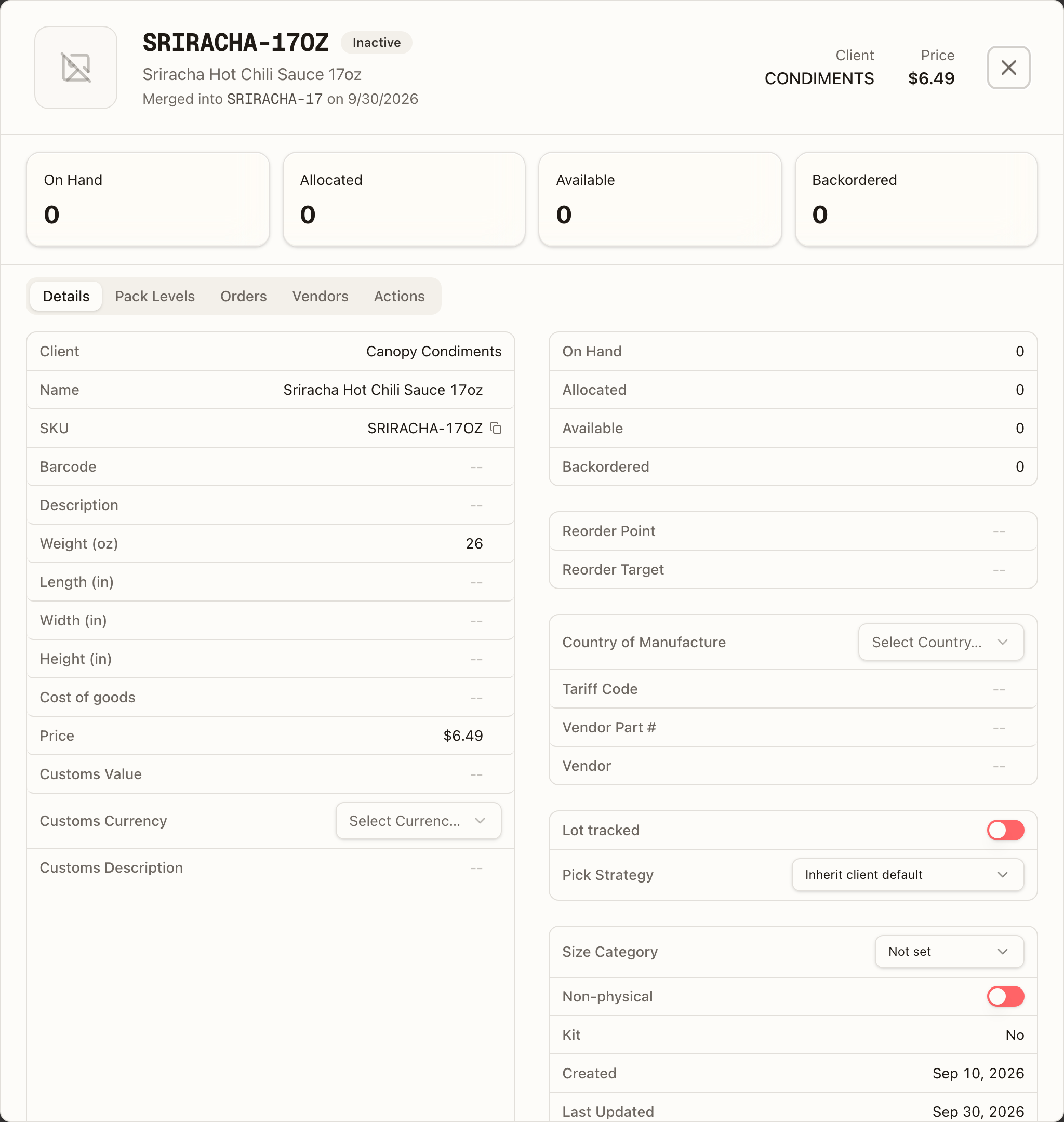
Click a SKU to open its detail view. The header shows the code, its Active / Inactive badge (plus Kit, Non-physical or Needs review), the name — and, on a SKU merged into another, a Merged into CODE on date line linking to the SKU its code now points to — and the barcode, client and price.
Four KPI cards — On Hand, Allocated, Available, Backordered (a fifth, Sell Ahead, when your account is opted in) — sit above five tabs: Details, Pack Levels, Orders, Vendors and Actions. Hover Allocated for what it counts: "Units reserved for orders, including Replenish orders backed by sellable overstock." — some of those units are in your 3PL's overstock rather than on a pick face, so the order waits on a replenishment rather than on new stock. Available is what is left to sell once every open order is accounted for — sellable stock, less Allocated, less Backordered — so a SKU every open order has already claimed shows 0 Available even before any of it is reserved.
Details
Every field on the SKU, editable in place: click a value, type, and press Enter or click away to save (Escape cancels). On the left: client, an Active switch (absent on a merged SKU — it stays inactive for good), name, SKU code (with a copy button), barcode, description,
Weight (oz), length / width / height (in), Cost of goods (the per-unit acquisition cost in dollars, zero or greater — it is what the Sales by SKU report reads for its COGS and Current value columns), price, and the customs fields — Customs Value, Customs Currency, Customs Description.
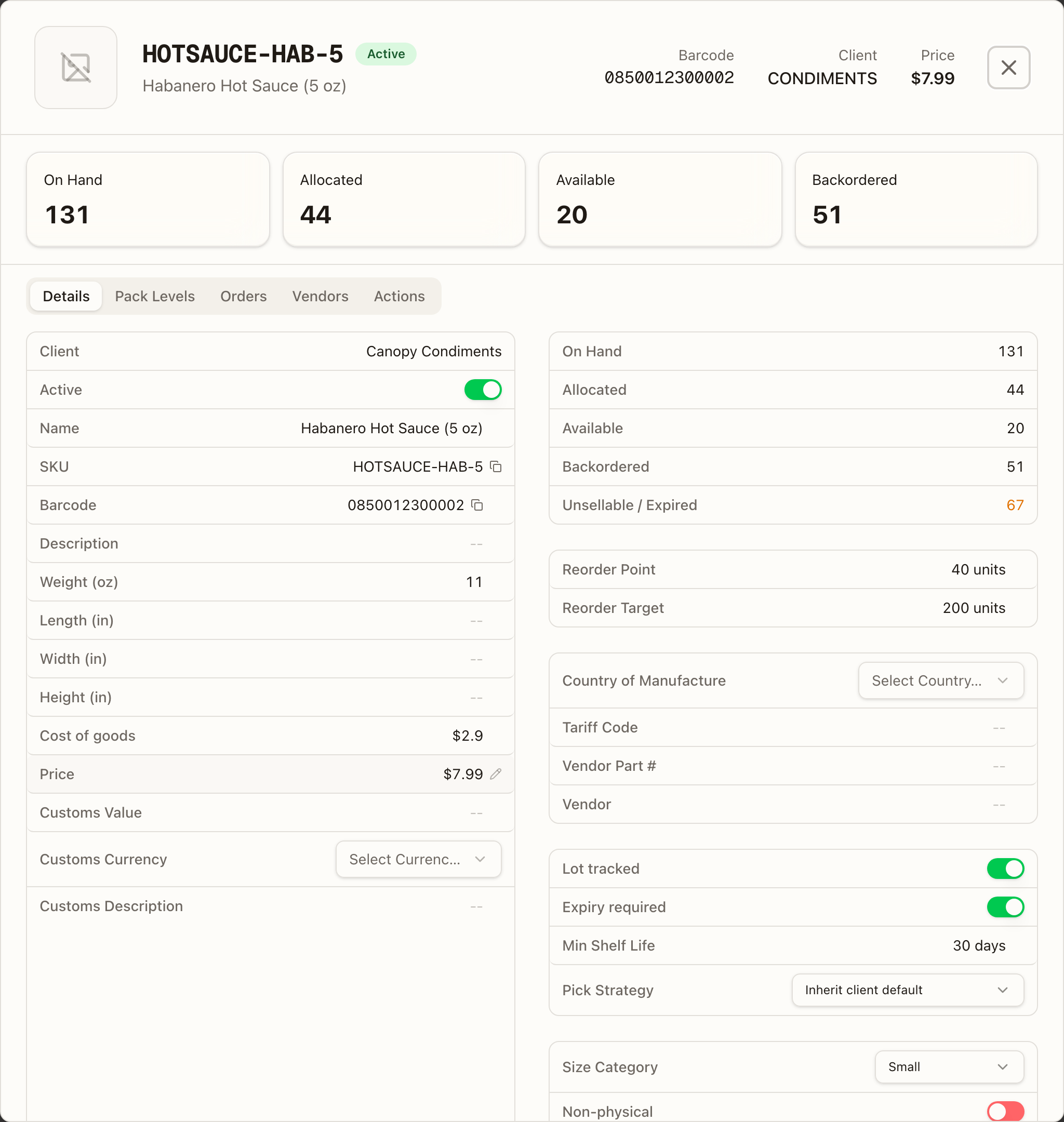
On the right:
- The stock figures — On Hand, Allocated, Available, Backordered — and an Unsellable / Expired line, shown only when stock sits on an expired, short-dated, on-hold, or recalled lot.
- Sell Ahead (opted-in accounts only) — the live balance, and a table of the open POs behind it: PO (linked to the purchase order), ETA, Expected, Received and Sell ahead remaining.
- Reorder Point and Reorder Target in units. The reorder point is what turns the list's days-of-stock pill red regardless of velocity.
- Trade fields: Country of Manufacture (a dropdown), Tariff Code, Vendor Part #, Vendor.
- Lot tracked — flip it on and Expiry required and Min Shelf Life (days) appear beneath it. Pick Strategy is shown for every SKU: leave it on Inherit client default, or force FEFO — first expired, first out, FIFO — first in, first out, or Bin efficiency — largest stock first.
- Size Category, a Non-physical switch, whether it's a Kit, and the created / last-updated dates.
Switch Lot tracked on before the first receipt. Once it's on, receiving requires a lot number; stock received while it was off stays untracked.
Pack Levels
The pack forms the SKU is stocked in — Each, Inner pack, Case, Master case, Pallet — each with an optional label, its Eaches (how many units it holds) and a barcode. This is what a wholesale quantity in cases converts against. Edit Pack Levels (or Add Pack Levels on a SKU with none — it defaults to eaches) lets you add levels and set their counts; Each is always the base at 1, and every higher level must hold more eaches than the one below and be a whole multiple of it. Once a sealed level exists, an Auto break-pack during picking switch appears: when loose units run short mid-pick and sealed packs are in the bin, the picker is prompted to open exactly the number needed.
Orders
Every order this SKU is on, newest first — the demand behind the Allocated and Backordered figures. An order your 3PL merged into another is no demand of its own: the order it ships in holds the reservation, so a merged unit never counts twice.
A kit's own line, and a line for an item with no stock, stop counting once they are packed. Neither holds units, so after packing they owe nothing and never show as backordered.
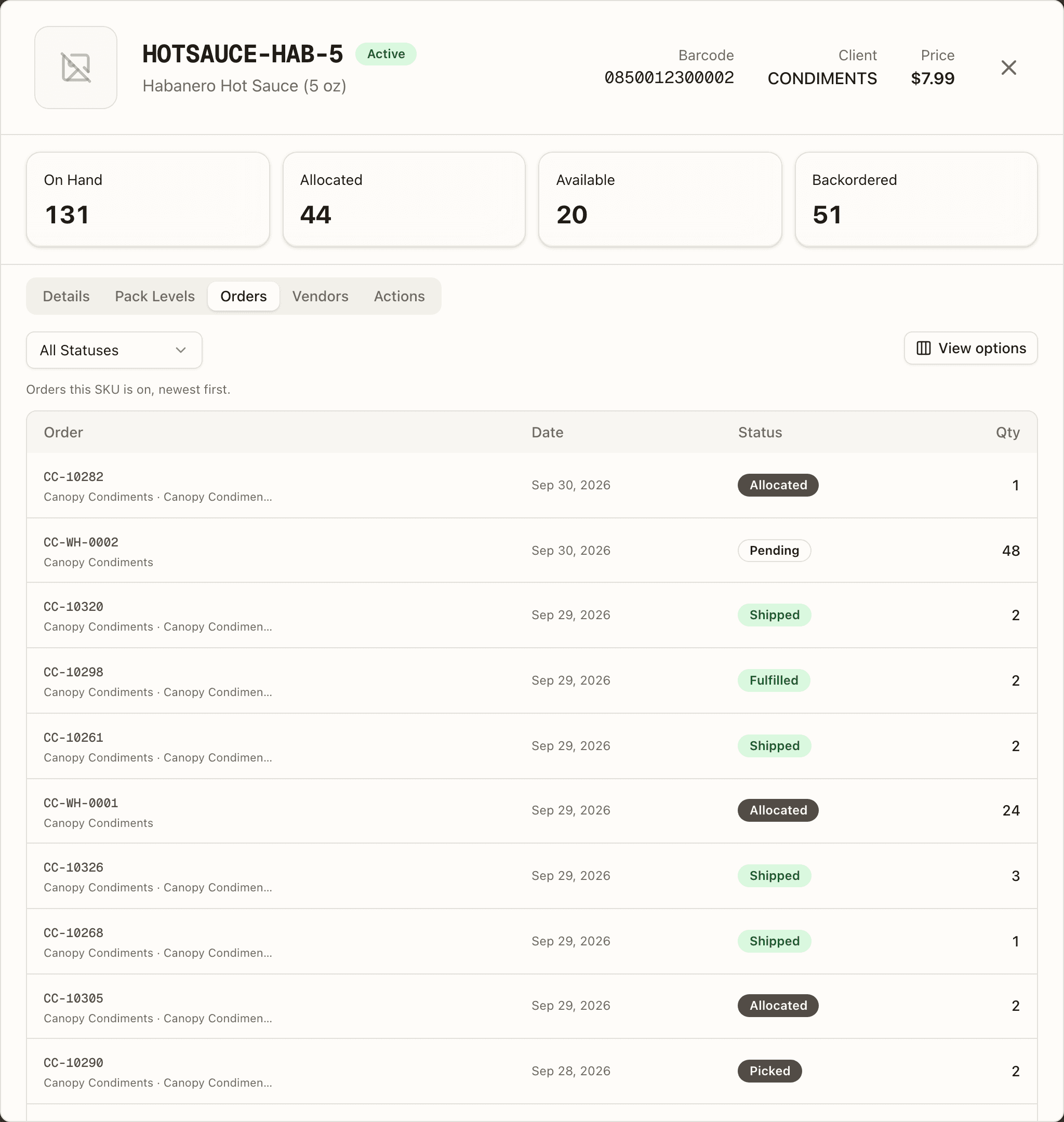
Each row shows the Order number (a link that opens the order) with your client name and the sales channel beneath it, the Date, its Status badge, and the Qty of this SKU on it. Filter by one or more order statuses with the status dropdown; the active filter shows as a chip you can remove. The status list includes Replenish: the units are reserved for the order but sitting in your 3PL's overstock, so the order is waiting on a shelf top-up, not on stock. Its badge is amber, and hovering it reads "Stock is available in overstock. Replenish picking locations or fulfill through Bulk Ship." When the SKU shipped inside a kit, a Kit component column names the kit and links to it. A SKU that has never been ordered reads "This SKU isn't on any orders yet." A line that arrived on a code your 3PL has since merged into this SKU reads via merged SKU CODE under its order number — the history stayed on the retired SKU, and this tab reads it so the demand behind yours is complete.
Vendors
Every purchase order this SKU is on, newest first — where the stock comes from, and what's still due in.
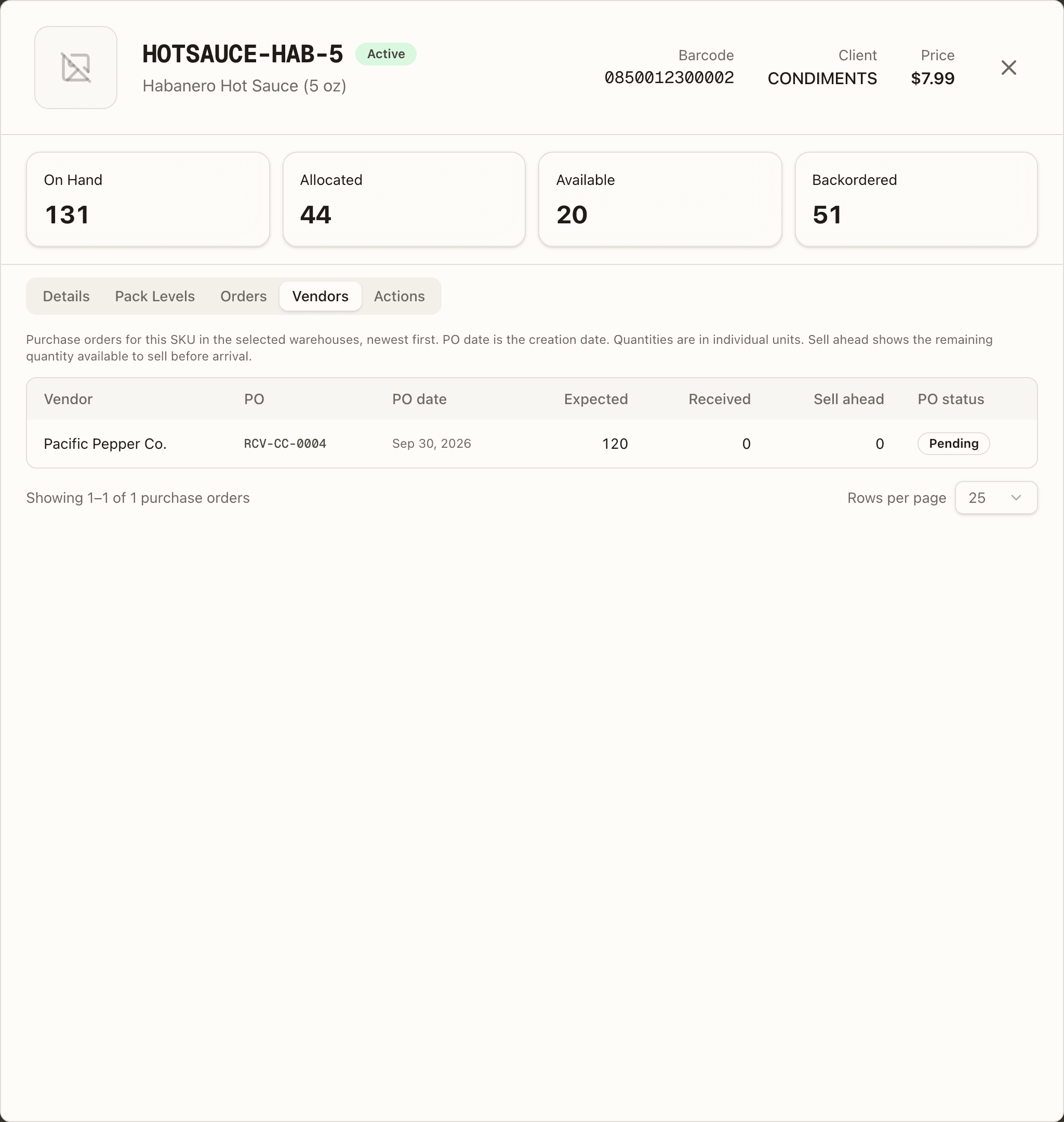
Each row shows the Vendor (Not specified when the PO doesn't name one), the PO — your own PO number where the shipment carries one, otherwise its shipment number, as a link into the receiving record — the PO date it was created, then Expected, Received and Sell ahead, and the PO status: Pending, In Progress, Completed or Cancelled.
Quantities are individual units. Sell ahead is how many of that PO's units
are still available to sell before it arrives — 0 when your brand doesn't
sell ahead.
The tab follows the warehouse selector in the top bar, so it lists only POs heading for the warehouse you're looking at; leave it on all warehouses to see every one. A SKU with nothing inbound reads "No purchase orders found for this SKU in the selected warehouses."
Actions
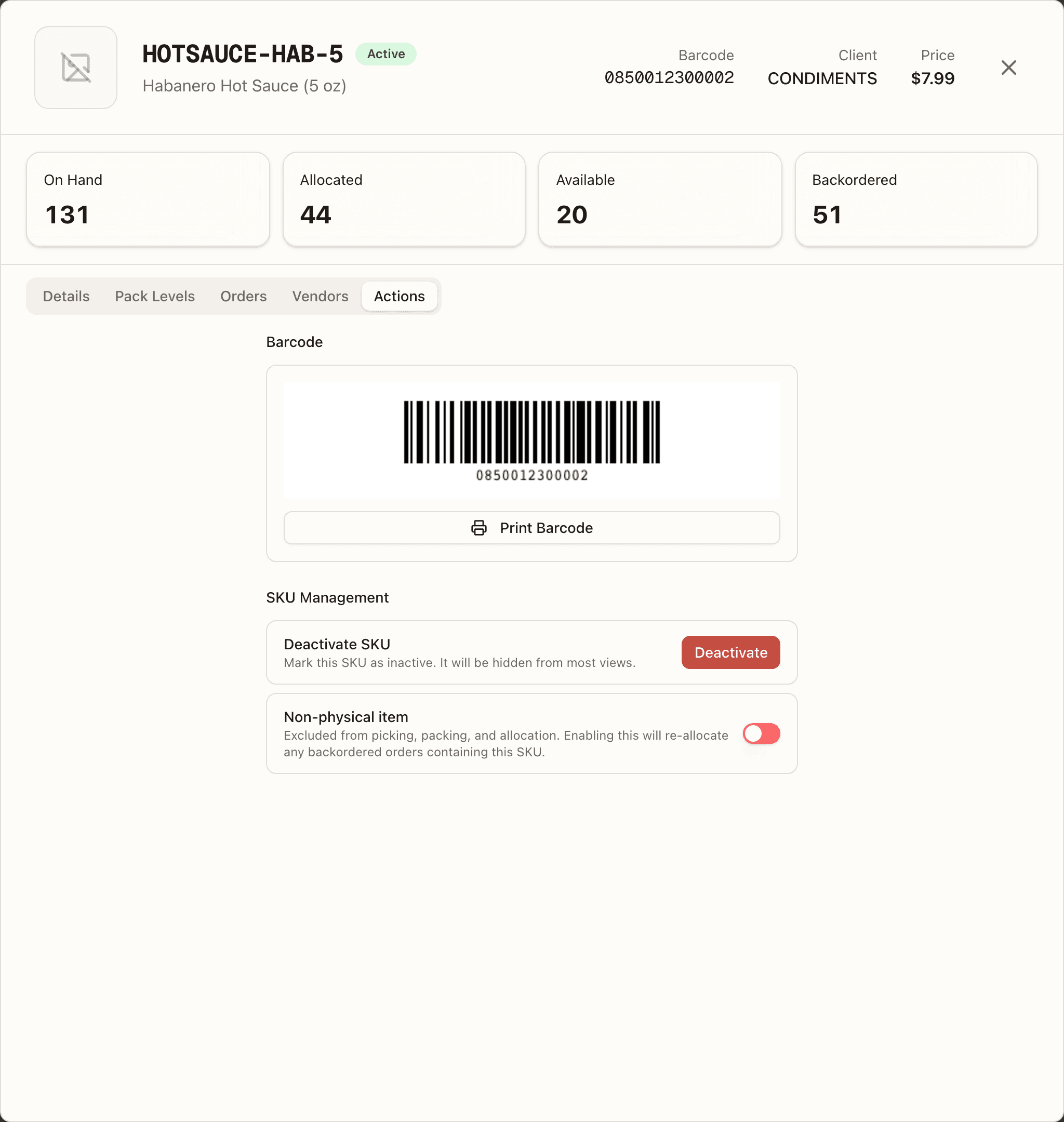
A printable barcode for the SKU — the barcode you set, or the SKU code itself when there is none (your 3PL's scanners resolve either) — with Print Barcode. Below it, SKU management: Deactivate (or Reactivate) the SKU — not offered on a SKU that was merged into another — and a Non-physical item switch; turning that on re-allocates any backordered orders that contain the SKU.
Merged SKUs and SKUs under review
Two things on a SKU are your 3PL's doing, not yours:
- Needs review marks a SKU Canopy created by itself when an order arrived with a code it didn't recognise — the name is the channel's product title, and the order waits as a backorder because no stock can arrive on a code nobody set up. Your 3PL either maps it onto the SKU it really is or keeps it as a new product; until then it sits in your catalogue as an ordinary active SKU.
- Merged into CODE on date, under the name of an inactive SKU, means your 3PL folded it into another SKU: its open orders, stock and channel listings moved there, and its code now points at that SKU, so an order, a scan or an import that still uses the old code lands on the kept one. What had already shipped stays on the retired SKU, which is why the kept SKU's Orders tab lists those lines as via merged SKU CODE. A merged SKU can't be reactivated.
For a kit SKU, a Kit Components tab replaces Pack Levels — it lists each component, how many go into the kit, and how many kits you can build (the scarcest component is flagged as the bottleneck).
How to add a SKU
Open SKUs and press Add SKU
Open Inventory → SKUs and press Add SKU in the top right. The Add SKU dialog opens, headed "Create a new product SKU".
Type the SKU Code and Name
Fill in SKU Code (for example WIDGET-001) and Name. These two fields are required: Create SKU stays disabled until both have a value.
Add the optional details
Fill in what you know: a Description, the Barcode (UPC / EAN), the Weight in lbs, Length, Width and Height in inches, and a Size Category of Small, Medium, Large or Extra Large (it starts on Not set). Storage Tags and Initial Stock are not on your form: your 3PL decides where a SKU may be stored and receives its first units.
Choose the kind of SKU
Leave both switches off for an ordinary product. Flip Kit / Bundle for a bundle made of other SKUs: the dialog becomes Add Kit, a Components search ("Search SKUs to add...") replaces the physical fields, and you add each component with its quantity. At least one component is required. Flip Non-physical item for a service, fee or digital item that skips picking and packing.
Press Create SKU
Press Create SKU (or Create Kit). The button reads Creating… while it saves, then the dialog closes and the new SKU appears in the list. Stock arrives when your 3PL receives units against it. If the save is refused, for example because the barcode is already on another SKU, the reason shows under the form and nothing is created; fix the field and press Create SKU again.
How to bulk-edit SKU attributes
Open SKUs and press Bulk edit attributes
Open Inventory → SKUs and press Bulk edit attributes in the top right. The Bulk edit SKU attributes dialog opens on its Edit attributes view, with a Job history button beside it. Four groups of fields can be changed this way: Customs details, Descriptions, Vendor information and Weight & dimensions.
Press Export catalogue CSV
Press Export catalogue CSV. A file named sku-attributes.csv downloads with every SKU in your catalogue, one row each: first the read-only columns (the ID, SKU code, name, client, kit flag and dates, each headed (read-only)), then every editable column.
Edit the file in a spreadsheet
Change the cells you want. Keep the ID column. Delete any column you do not want to touch; a column you keep is applied in full, and a blank cell in it clears that value. A read-only column you keep must still match the catalogue when you upload: if a SKU changed in between, the file is rejected with "This field is read-only in bulk edits. Restore its exported value or remove this column.", so upload soon after exporting, or delete every read-only column except the ID. Open CSV help for the rules: weight in oz, dimensions in inches, country and currency as codes (CA, USD), tariff codes of 6 to 13 digits; in Excel, import code columns as Text, keep any apostrophe prefixes, and save as UTF-8 CSV. The limit is 5,000 SKUs and 10 MB per file.
Press Upload edited CSV
Press Upload edited CSV and choose your file. The button reads Validating CSV… and the dialog says "Validating every row. No SKU changes have been written…" while every row is checked.
Read the preview
The preview shows the file name, a status badge, and a line counting the rows, the SKUs to change, the unchanged rows, the values to clear and the errors. One table lists each column with its Changes and Clears; a second lists every change by Row / SKU with its Before and After (a Clear value badge where a blank will wipe a field), 25 at a time, with Previous changes and Next changes to page through it. If there are errors the box reads "The file cannot be applied. No SKU changes were written." with the first ten listed; press Download all errors for the full list, fix the file and upload it again.
Tick the confirmation and press Apply changes
Tick "I reviewed the N SKU changes, including N clears." and press Apply changes to N SKUs. The button reads Applying all changes…, then a toast says "Updated N SKUs" and the dialog reads "Applied to N SKUs. Original files and prior values are available in job history." Only the person who uploaded the preview can apply it; anyone else reads "Only the uploader can apply this preview. Upload the file to start your own job."
Undo from Job history if you need to
Press Job history. Each upload shows its file name, status, how many SKUs it updated, and who ran it and when, with View preview, Original file (.txt), an Error report on a rejected or failed job, and Prior values CSV on an applied job. To put the old values back, download Prior values CSV and upload it as an edited CSV.
Edit a selection instead of the whole catalogue
To change a few SKUs without a spreadsheet, tick their rows in the list (Select all N matching rows in the selection bar extends a selection across pages) and press Edit selected attributes. The dialog shows a form instead: tick each field you want to change, type the shared value (a ticked field left blank clears it), and press Review changes. The same preview and Apply changes steps follow.