

Rate Cards
One client's pricing at a time — the card's rules by category, its draft / scheduled / active / ended lifecycle, its billing cadence, and the dialogs that create, revise, duplicate and version it.
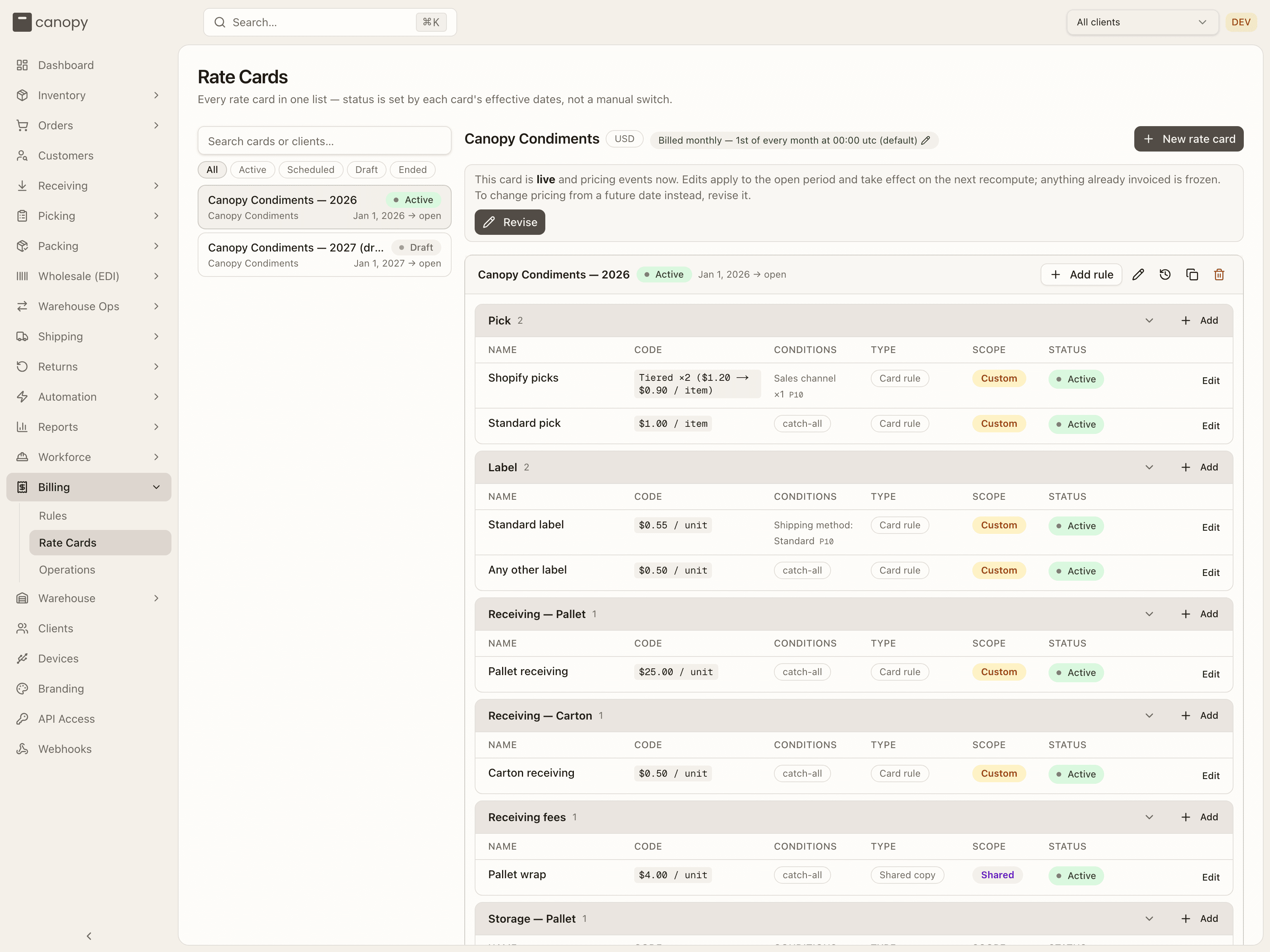
Billing → Rate Cards (/billing/rate-cards). A card-first list: every
rate card in the tenant as its own row on the left, and the selected card's
rules by category on the right. A card's status comes purely from its
effective dates — there is no active / inactive switch — so exactly one card
is ever live per client. Pinning a client in the top bar narrows the list to
that client's cards; ?card= deep-links a card, and the Rules view's Open
card lands here with ?client=.
Who can author
Every rate-card and rule write is Tenant Admin only on the server, so a
Tenant Operator sees the rail, the card and its rules read-only: no New
rate card, Revise, Publish, Add rule, pencil, trash or row
editors, and the cadence badge is plain text. The Version history and
Duplicate icons still show; a duplicate is refused on submit, since that
route is admin-only too. A partner API credential follows the same line: a
tenant-wide one holding rate-cards:read can read the cards, their rules,
version chains and rule history, and one pinned to a client is refused,
exactly as a client login is.
The card rail
Search cards or clients… matches a card's name or the client's name or code; the chips All / Active / Scheduled / Draft / Ended filter by status. Each row shows the card's name, its status pill, the client and the effective window (Jan 1, 2026 → open). Live cards list first, then upcoming, drafts, the rare superseded card, and past cards, newest window first within each group. An empty filter reads "No rate cards match"; narrowing the list never swaps the card you are reading.
Without any client the page reads "No clients — Create a client before configuring pricing."; a client in scope with no card at all shows "No rate card for <client> — This client's billable events are not being priced." with a New rate card button.
Statuses
One badge answers three questions at once — is it live, is it complete, and where is it in its window:
| Pill | Means |
|---|---|
| Draft | Not published — it prices nothing until it's given a live window. |
| Scheduled | Goes live on its start date. (It seals the current card when it does.) |
| Scheduled · needs pricing | Goes live on its start date, but a required category has no rule — events in that category will be recorded as uncharged from then on. |
| Active | Live and pricing every required category for this client. |
| Active · needs pricing | Live and pricing, but a required category has no rule — those events are recorded as uncharged until you add one. |
| Ended | A past version — its date window has elapsed. |
| Superseded | Its window covers today, but a later card is pricing events now. |
The required categories for a client are Pick always, Storage — Pallet when the client has single-client pallets, Storage — Bin when any bin holds the client's stock, and Label when the card charges shipping labels; receiving is deliberately never required. The same rule drives the Missing rule badges on the card.
The selected card
The detail pane opens with the client's name, its currency, a Billed monthly — 1st of every month at 00:00 utc (default) badge (the client's billing cadence; admins click it to change it — see Billing cadence) and New rate card. Beneath that, one of:
- an amber This card is missing required rules for: … banner ("Events in these categories are landing as uncharged." on a live card; "…will land as uncharged once this card goes live." otherwise);
- on a draft, "This card is a draft and prices nothing. Publishing hands it its effective window — it goes live on its start date (or immediately, if that has passed)." with Publish;
- on the live card, "This card is live and pricing events now. Edits apply to the open period and take effect on the next recompute; anything already invoiced is frozen. To change pricing from a future date instead, revise it." with Revise.
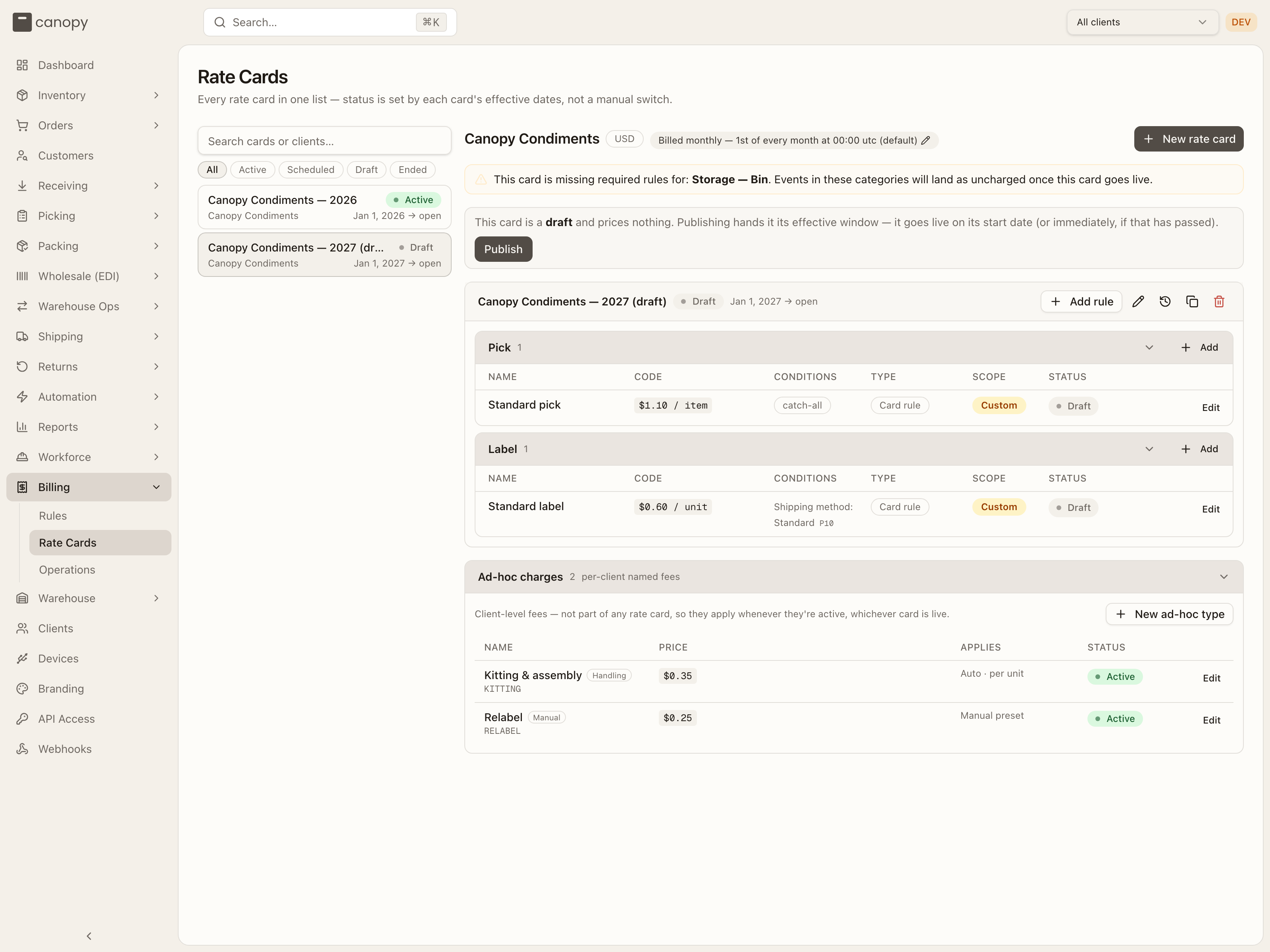
Publish confirms — "It stops being a draft and takes effect on its start date. You can't un-publish it — revise it into a new version instead." — or, when publishing would switch which card prices live events right now, spells that switch out and asks for Publish anyway. A published card can never be turned back into a draft.
The card panel
The card's header repeats its name, status pill and window, adds a labels not billed badge when the card doesn't charge shipping labels, and carries the card-level actions: Add rule, the pencil (Edit card), the clock (Version history), the copy icon (Duplicate to other clients) and the trash (Delete this card and all its rules).
Below it, one collapsible section per category that has rules — in the order Pick, Label, Receiving — Pallet, Receiving — Carton, Receiving fees, Storage — Pallet, Storage — Bin, Return Processing, Return fees, Order fees, Ad-hoc, Shipping Reconciliation — plus, on the live card, every required category that has none (a red Missing rule badge and "No rule — this category is required for this client."). Each section header has a + Add for that category (Ad-hoc has none — its fees live in the section below); Storage — Bin also has Per bin type. An empty card reads "No rules on this card. Use "Add rule" to start pricing."
A Pick or Label section whose rules carry Order count in period / Event count in period windows shows a coverage strip above its rows — each rule's range painted across 1…∞, with any Gap: a–b listed beneath in yellow, so a band nobody prices is visible before you save.
The rows are the same table as the Rules view without the Clients column — Name (rename in place; a shared copy shows its template's name and is renamed through it), Code, Conditions, Type (Card rule or Shared copy), Scope, Status and Edit. Every row wears the card's status, with one exception: a rule that was itself switched off reads Inactive — "This rule is switched off and prices nothing, even though its card is live." The Ad-hoc section, if a legacy card still has one, notes that ad-hoc fees live in the "Ad-hoc charges" section below — these card rules are legacy and never price events.
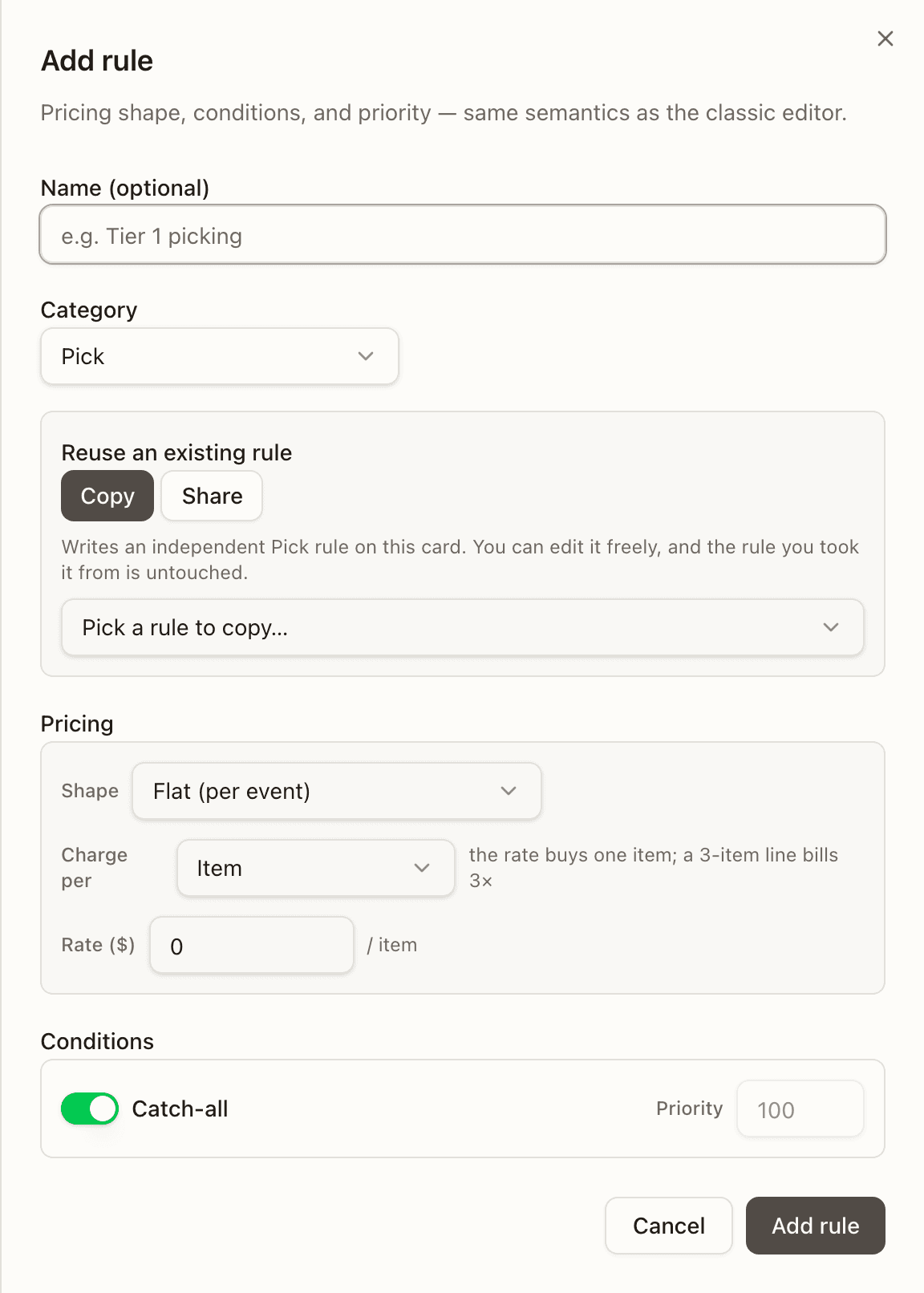
Add rule opens the rule editor in create mode, with its Reuse an existing rule picker for copying or sharing a rule from another card; + Add on a section preselects the category.
Delete asks Delete "name"? — on the current card, "This removes the card and all its rules. The server refuses if any invoice has already priced charges under this card."; on a historical one, that its window is not re-seamed, so events in it will have no rate card and price as uncharged.
The dialogs
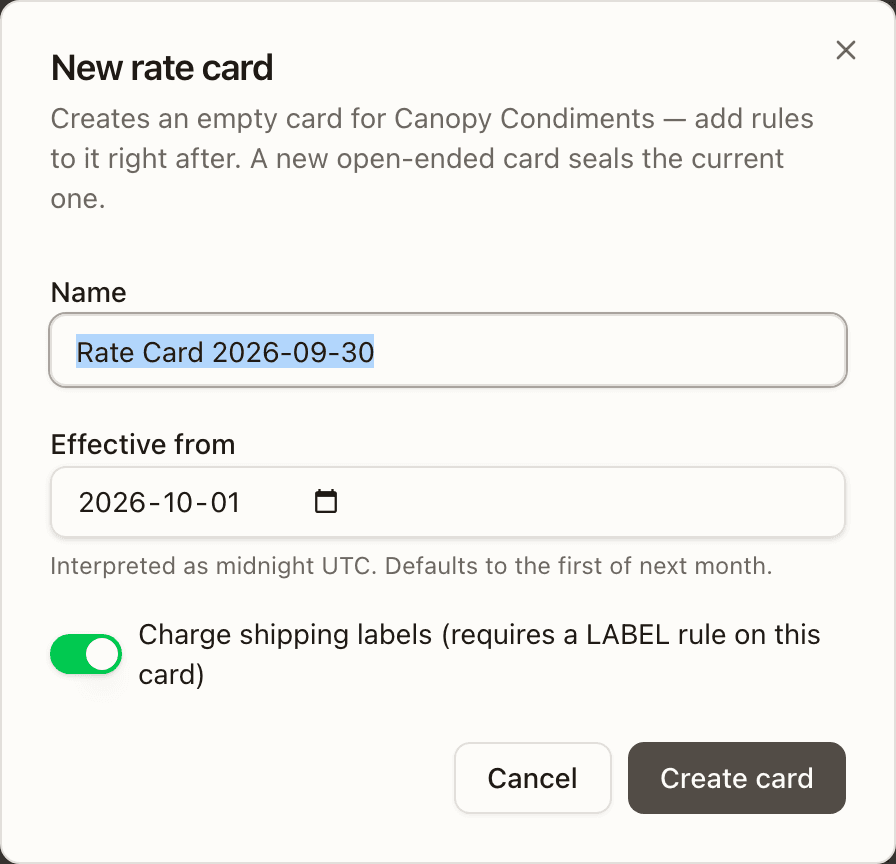
New rate card
"Creates an empty card for <client> — add rules to it right after. A new open-ended card seals the current one." Name (defaults to Rate Card <today>), Effective from (a date, read as midnight UTC; defaults to the first of next month so it doesn't overlap the current period) and Charge shipping labels (requires a LABEL rule on this card). Create card then warns "No rules yet for required categories: … Add rules or events will land uncharged." The server refuses a second card starting on the same date — "Another rate card for this client already starts at that date".
Revise
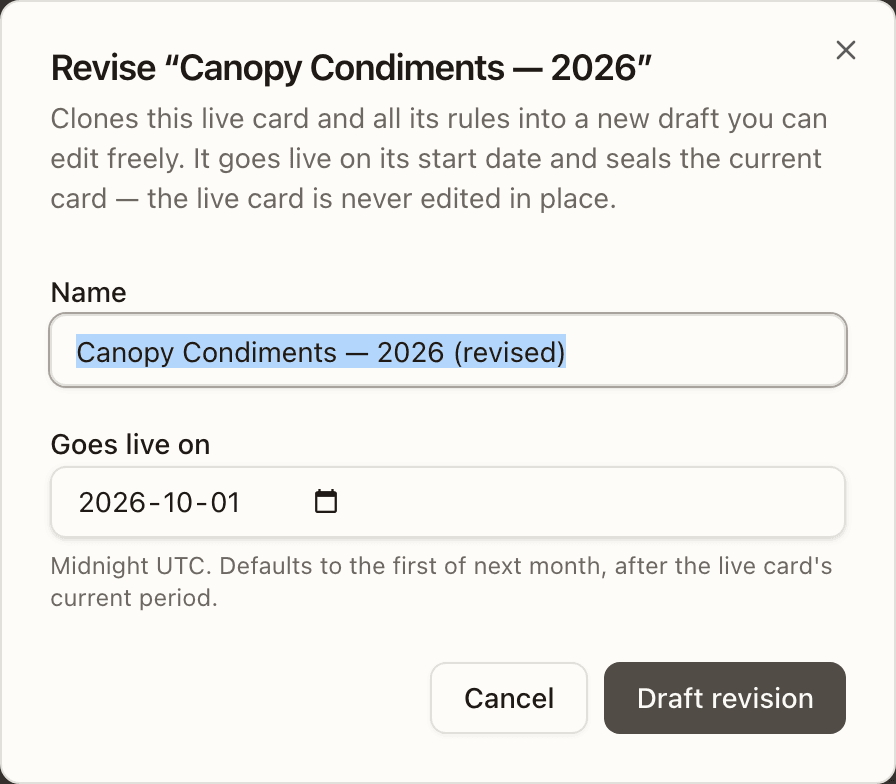
A live card is never edited in place for a future date; Revise clones it — "Clones this live card and all its rules into a new draft you can edit freely. It goes live on its start date and seals the current card — the live card is never edited in place." Name defaults to <name> (revised); Goes live on must be today or later ("A revision can't start in the past — it would re-price events that have already been billed on the live card.") and not a date another card already starts on. A card missing required rules says the revision inherits that gap, and that a revision only fixes it from its start date — to recover the events already uncharged in the open period, add the rule to the live card instead. Shared-rule copies keep their link on the new version. Draft revision creates the card and every cloned rule in one transaction and selects it.
Edit card
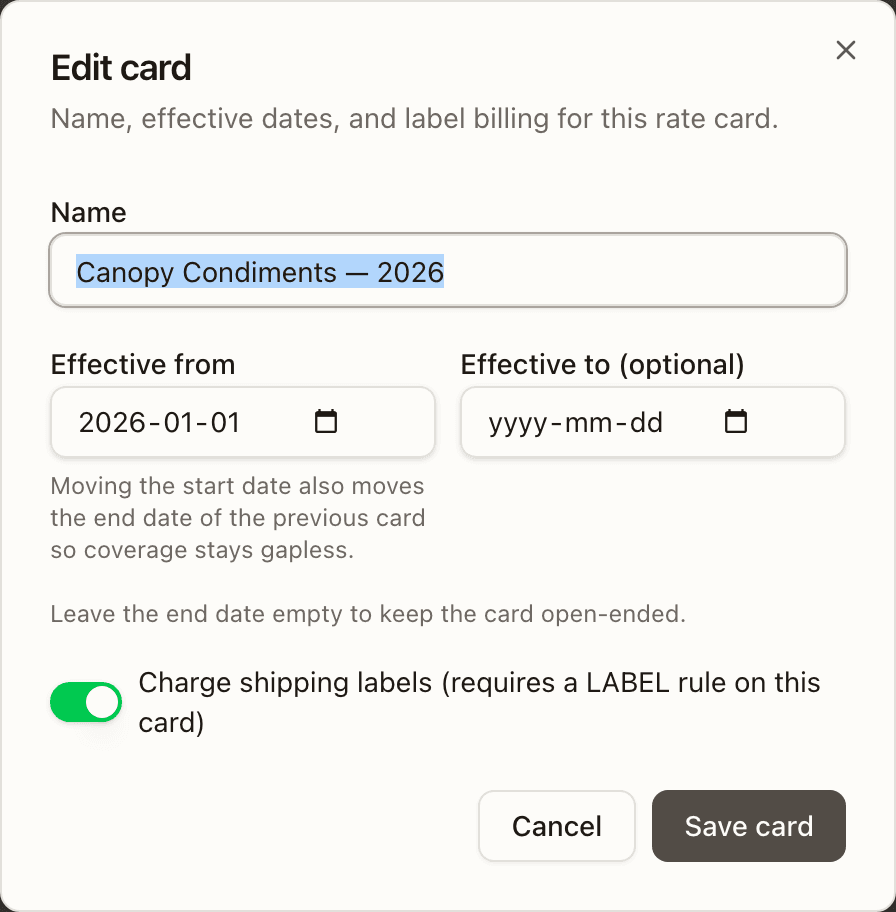
The pencil edits Name, Effective from ("Moving the start date also moves the end date of the previous card so coverage stays gapless."), Effective to (optional) — "Leave the end date empty to keep the card open-ended." — and Charge shipping labels. If the new dates would switch which card prices live events right now, the dialog says so — "This change switches the card pricing live events from "A" (from <date>) to "B" (from <date>) as of now. New billable events will be priced by the new card immediately. Continue?" — and the button becomes Switch active card & save. The server refuses moving both boundaries in one save, a start date another card already starts on, a start date that would leave a gap ("Extend the previous card first, or move the start earlier."), and an open end while a later card exists.
Version history
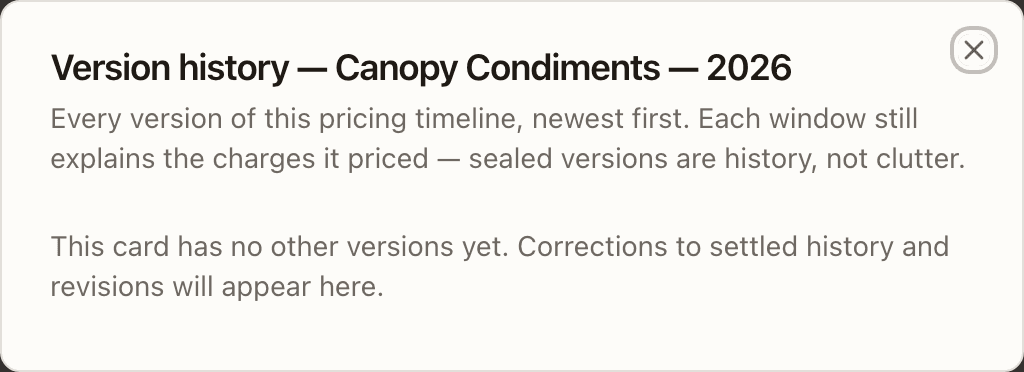
"Every version of this pricing timeline, newest first. Each window still explains the charges it priced — sealed versions are history, not clutter." Each row shows the window, a Live badge on the current version, a Correction badge on a version started by an in-place correction (the previous version sealed at the period start, its rules carried forward), this card on the one you opened it from, and its rule count. Five show; Show all N versions unfolds the rest. A card with no other versions says so.
Duplicate to other clients
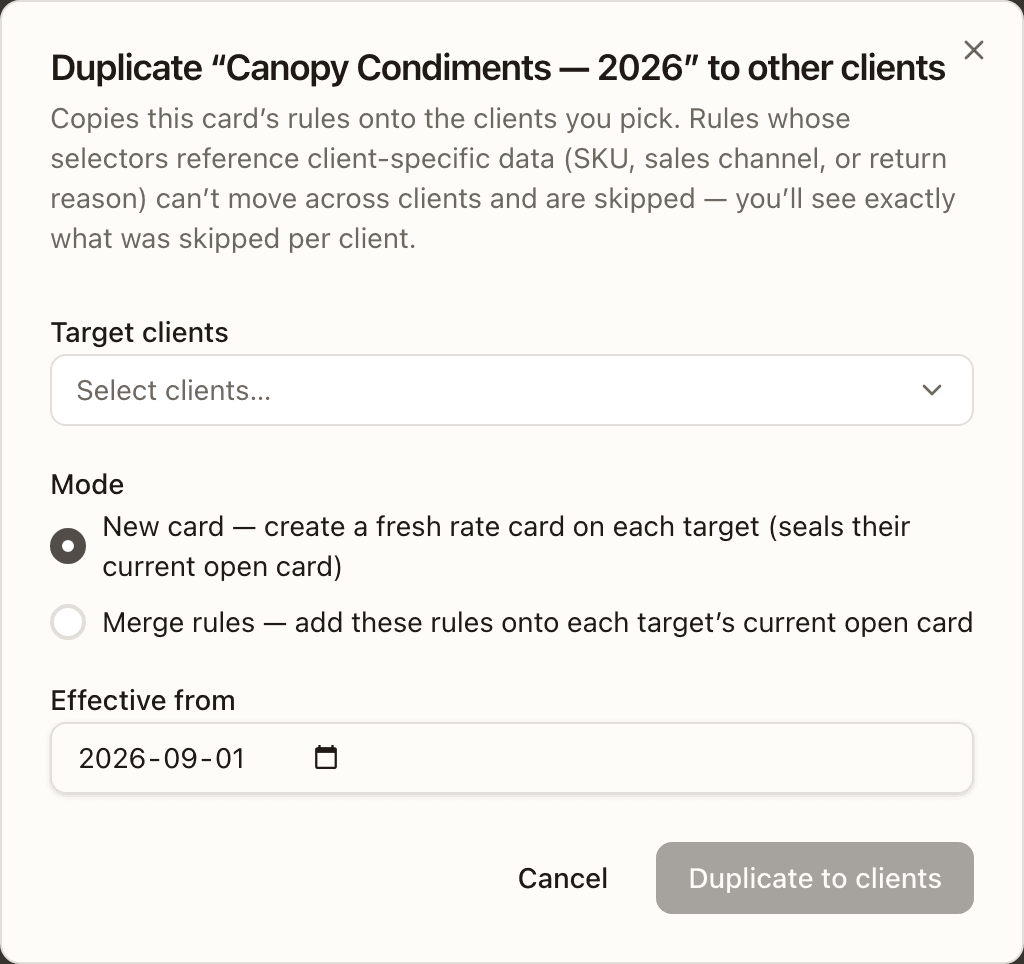
"Copies this card's rules onto the clients you pick. Rules whose selectors reference client-specific data (SKU, sales channel, or return reason) can't move across clients and are skipped — you'll see exactly what was skipped per client." Pick the target clients (the source client is excluded) and a Mode — New card (create a fresh rate card on each target (seals their current open card), with an Effective from date) or Merge rules (add these rules onto each target's current open card). Duplicate to N clients then reports per client: created · 9 rules copied, or Skipped with the error, and each rule skipped with its reason.
Per bin type
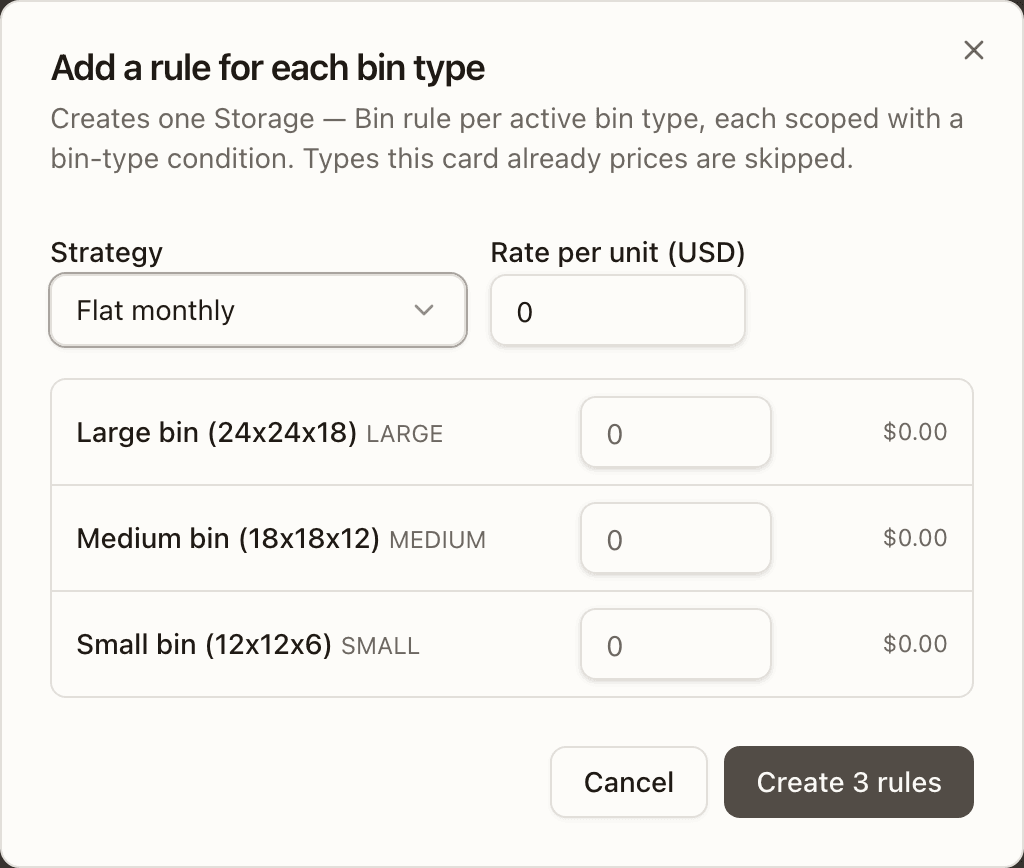
The Storage — Bin section's Per bin type opens Add a rule for each bin type — "Creates one Storage — Bin rule per active bin type, each scoped with a bin-type condition. Types this card already prices are skipped." Set the Strategy and a default Rate per unit, override the rate per type where needed (each row shows the rate it will get; a type already priced reads Already covered — skipped), then Create N rules. Rules are created one by one and the toast reports created / skipped (already covered) / failed. The catalogue itself is the platform's bin types.
Billing cadence
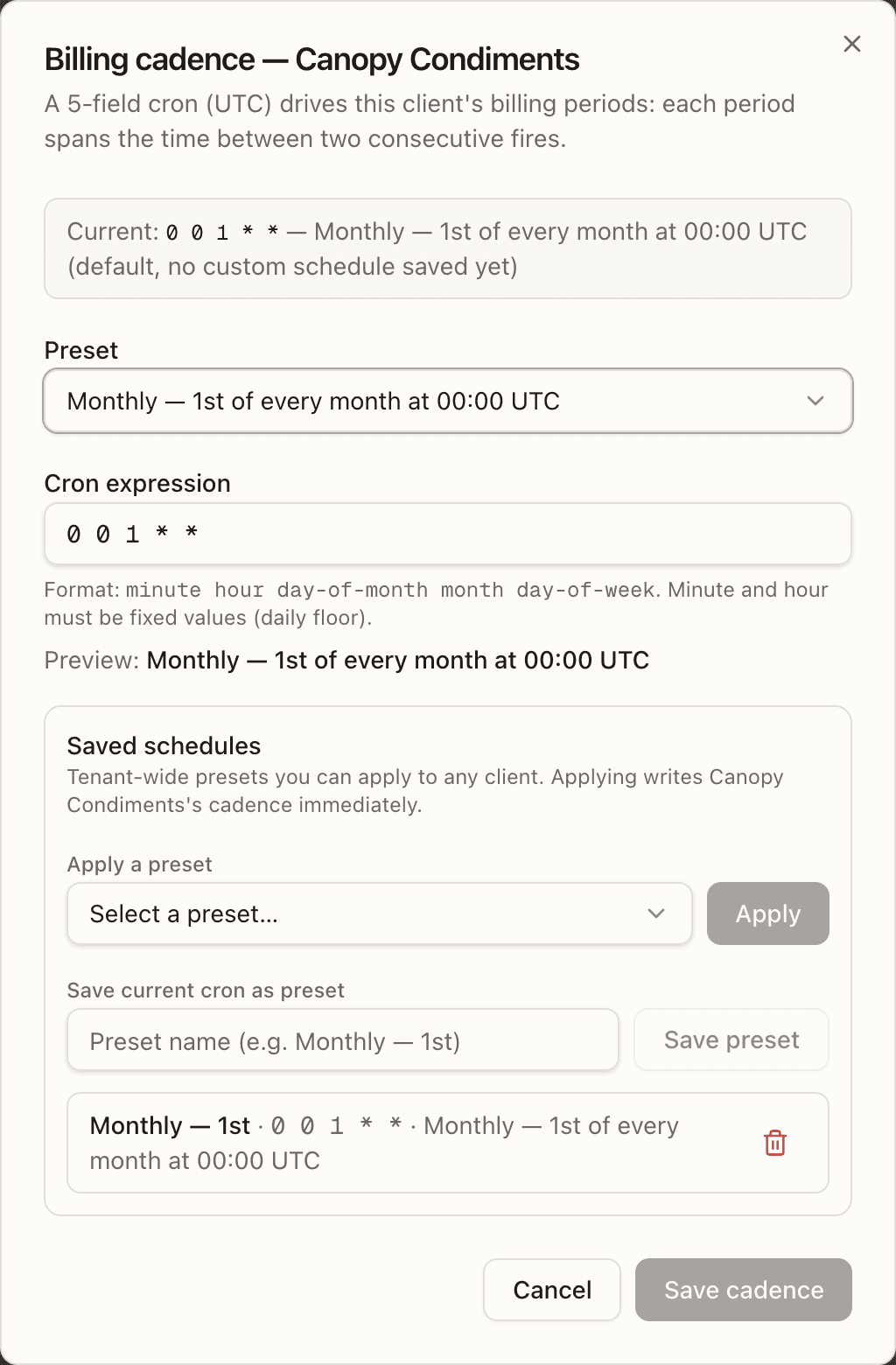
The Billed … badge in the client header opens Billing cadence — <client>: "A 5-field cron (UTC) drives this client's billing periods: each period spans the time between two consecutive fires." It shows the current cron and its description (with (default, no custom schedule saved yet) until one is saved), a Preset select — Daily — Every day at 00:00 UTC, Weekly — Every Monday at 00:00 UTC, Monthly — 1st of every month at 00:00 UTC, Quarterly — 1st of Jan/Apr/Jul/Oct at 00:00 UTC — and the raw Cron expression (minute hour day-of-month month day-of-week; minute and hour must be fixed values — the daily floor) with a live Preview. Saved schedules are tenant-wide presets: Apply one (it writes this client's cadence immediately), Save current cron as preset with a name, or delete one with its trash icon. Save cadence is enabled once the cron is valid and changed. Everything in the dialog is admin-only; an operator sees "Only tenant admins can change the billing schedule."
Ad-hoc charges
Under the card sits the client's Ad-hoc charges section — "Client-level
fees — not part of any rate card, so they apply whenever they're active,
whichever card is live." — with New ad-hoc type and a table of every
type: Name (group chip and code beneath), Price ($0.25 or at
authoring), Applies (Manual preset, Auto · per order / per unit / per
line), Status (Active / Inactive) and Edit. Both buttons open the
same sheet as the Rules view, pre-scoped to this client — see
Ad-hoc charge types.
An empty catalogue reads "No ad-hoc charges for this client yet. Add named
fees like packaging or container destuffing here."
How to change a live card's pricing from a future date
Select the live card and press Revise
Pick the client's Active card in the rail. The live banner says edits made here re-price the open period; to change pricing from a date instead, press Revise.
Name the revision and set its start date
Keep or change the Name and set Goes live on — today or later, not a date another card starts on. Read the inherited-gap warning if there is one, then Draft revision. The new version appears in the rail as Scheduled and is selected.
Edit the rules on the revision
On the scheduled card, click a rule (or its Edit) to change its rate, tiers or conditions; use + Add on a section or Add rule to price a category it lacks — the Reuse an existing rule picker copies one from another card. Nothing you do here touches the live card.
Let it go live
On its start date the revision becomes Active and seals the previous card, whose status turns Ended. Version history on either card shows the whole timeline.
Rules
Every pricing rule across all clients in one list — card rules, shared rules, ad-hoc charge types and recurring charges — and the sheets that author them.
Operations
The money pipeline — billing periods and their charges, invoices, adjustments, carrier reconciliation, the ad-hoc approval inbox, and stranded money.